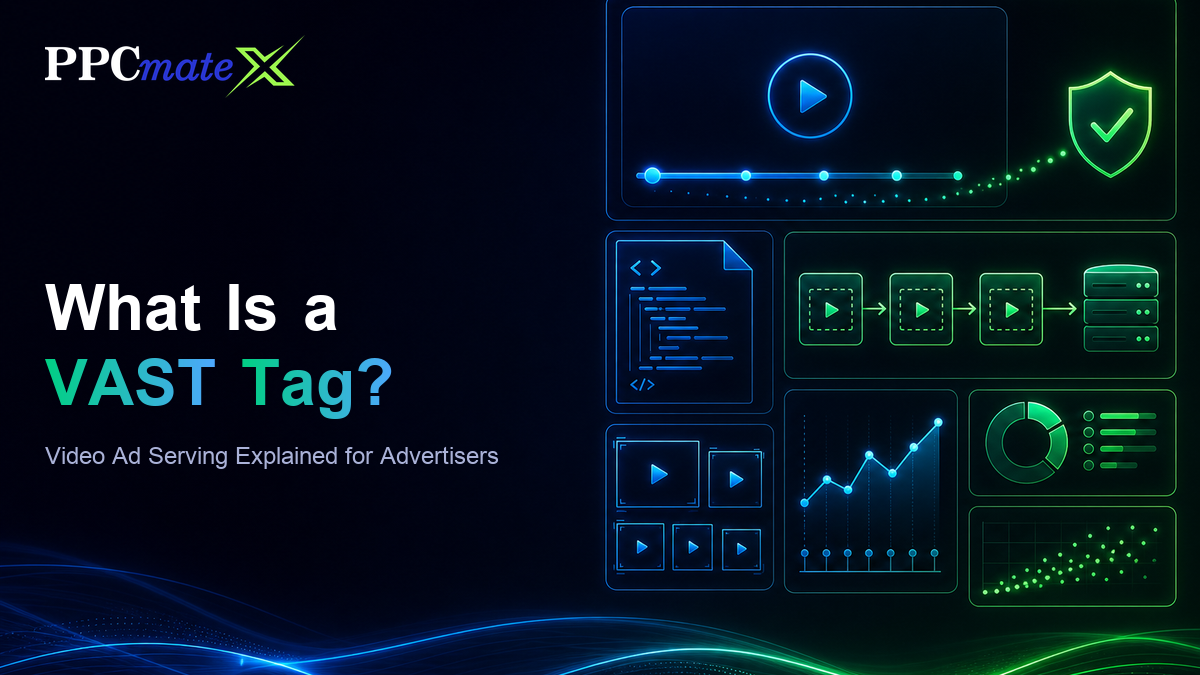
What Is a VAST Tag? Video Ad Serving Explained for Advertisers
If you have bought video inventory, you have probably been asked for a “VAST tag” or seen one mentioned in a report, an error log or a publisher spec sheet. Most advertisers never need to write one by hand, but knowing what a VAST tag does explains a lot: why some video impressions never play, why completion rates differ between sources, and where viewability and fraud checks actually happen.
This guide explains what VAST is, what is inside a VAST tag, how a video ad gets served from request to click, and what to check when a video campaign is not delivering the way you expect.
What Is a VAST Tag?
VAST (Video Ad Serving Template) is an XML standard from the IAB Tech Lab that tells a video player which ad to play, where to find the video file, and which URLs to call as the ad is shown, watched and clicked. A “VAST tag” usually means the URL a player calls to fetch that XML, though people also use the term for the XML response itself.
Before VAST, every ad server and every video player spoke its own format, so each pairing needed custom integration work. VAST gave the industry one shared language: any VAST-compliant player can play an ad from any VAST-compliant ad server. That is what makes programmatic video possible at scale, whether the ad runs in-stream before a publisher’s video or in an outstream player inside an article.
If you are new to the format itself, start with our video ads guide, which covers placements, targeting and bidding. This post focuses on the plumbing underneath.
What Is Inside a VAST Tag?
A VAST response is a structured document. Each element answers one question the player needs answered before, during or after playback.
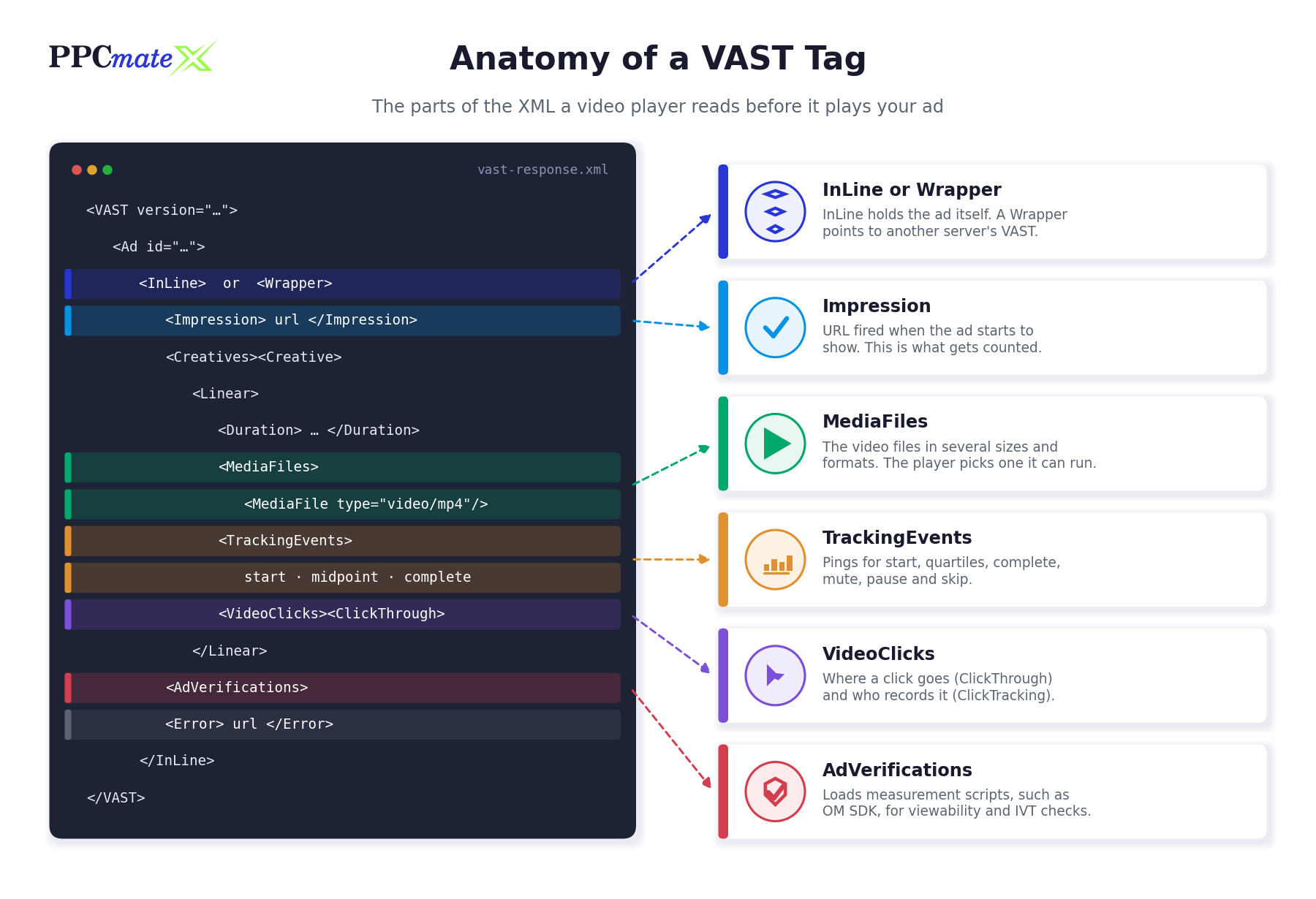
InLine vs Wrapper
An InLine response contains the ad itself: the media files, tracking URLs and click-through. A Wrapper response contains no video. It points the player to another server’s VAST URL, usually so an intermediary can add its own tracking. A player may follow several wrappers before it reaches an InLine ad, and each hop adds delay and another place where the request can fail.
Impression
The Impression element lists URLs the player calls when the ad starts to show. Under current VAST guidance that is when the first frame of the ad is displayed, not when the XML was fetched. This is the event that billing and reporting normally count, which is why the moment it fires matters.
Linear, NonLinear and Companion Creatives
- Linear ads take over the player for their duration: pre-roll, mid-roll and post-roll. This is what most advertisers mean by “video ads”.
- NonLinear ads appear over or beside the content while it keeps playing, such as an overlay banner.
- Companion ads are display units shown alongside the video ad, often a banner that stays visible after the video ends.
MediaFiles
A good VAST response lists several versions of the same video in different resolutions, bitrates and file types. The player chooses the one that suits its size, device and connection. If none of them are supported, the ad simply does not play.
TrackingEvents and VideoClicks
TrackingEvents are URLs called at points during playback: start, firstQuartile, midpoint, thirdQuartile and complete, plus interaction events such as mute, pause and skip. VideoClicks holds the ClickThrough URL (your landing page) and ClickTracking URLs that record the click. These are where completion rate and video CTR come from.
AdVerifications and Error
VAST 4.1 and later include an AdVerifications element that loads measurement scripts, typically built on the Open Measurement SDK (OM SDK), so independent vendors can check viewability and invalid traffic (IVT) without needing their own interactive ad code. The Error element lists a URL the player calls with a numeric error code when something goes wrong, which is your main diagnostic signal.
How a VAST Ad Gets Served, Step by Step
Here is the typical sequence for a linear video ad bought programmatically:
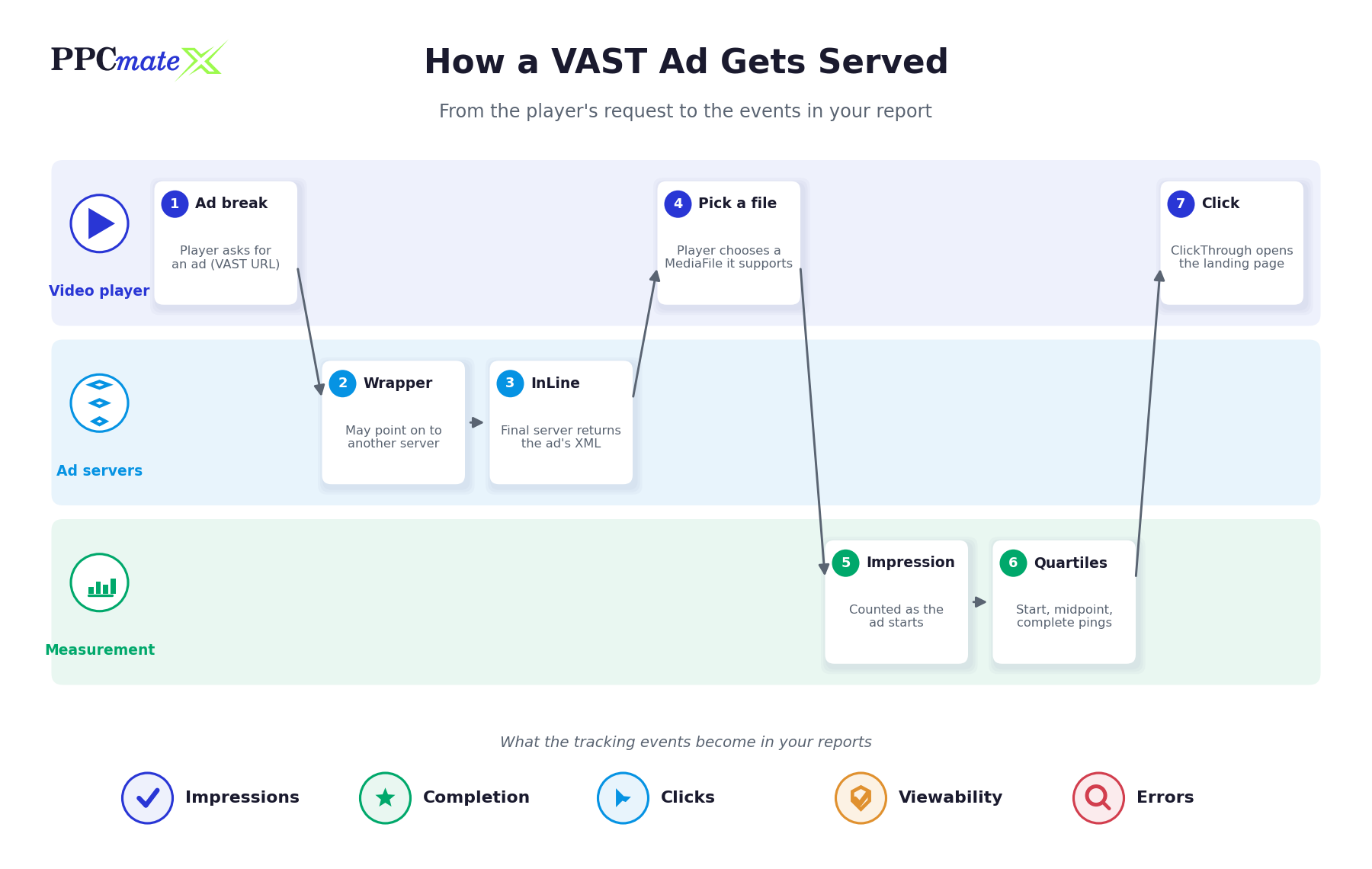
- The player reaches an ad break. It calls the VAST URL for that slot, often with details such as player size and page context.
- The auction runs. In programmatic buying, the publisher’s side auctions the slot and a demand-side platform (DSP) bids on the advertiser’s behalf. The winner’s ad is returned as VAST.
- Wrappers are followed. If the response is a Wrapper, the player requests the next VAST URL and collects each layer’s tracking along the way.
- The InLine ad arrives. The player reads the media files, tracking events, click-through and any verification scripts.
- The player picks a media file it can play at the current size and connection, and starts loading it.
- The impression fires when the first frame shows, followed by start and quartile events as the viewer keeps watching.
- The viewer clicks or the ad completes. A click fires ClickTracking and opens the ClickThrough URL; otherwise the complete event fires at the end.
Every arrow in that chain is a network request that can be slow or fail. That is the main reason video delivery numbers look different from display: an auction win is not the same as a played ad.
VAST vs VPAID vs VMAP vs OMID
VAST is often mentioned alongside a few related standards. They do different jobs:
| Standard | What it does | Status for advertisers |
| VAST | Describes a single video ad: files, tracking, clicks, verification | The core standard for video ad delivery |
| VPAID | Let an ad run its own code inside the player for interactivity and measurement | Deprecated by the IAB Tech Lab; many players and publishers no longer accept it |
| VMAP | Describes when ad breaks happen in a piece of content (a playlist of breaks) | Used by publishers; rarely something an advertiser touches |
| OMID / OM SDK | A shared way for verification vendors to measure viewability and IVT | Loaded through AdVerifications in VAST 4.1+ |
| SIMID | Adds interactive elements alongside a VAST ad without giving the ad control of the player | The interactivity replacement for VPAID |
The practical takeaway: if a partner still asks for VPAID creatives or VPAID-based measurement, expect reduced reach, because a large share of modern inventory will not run it.
Common VAST Errors and What They Mean
When a video ad fails, the player reports a numeric VAST error code to the Error URL. A few codes account for most problems:
| Error code | Meaning | Usual cause |
| 100 | XML parsing error | Malformed XML or an unescaped character in a URL |
| 301 | Timeout of a VAST URI in a Wrapper | A slow server somewhere in the wrapper chain |
| 303 | No VAST response after one or more Wrappers | An intermediary returned an empty response, often no fill |
| 401 | Media file not found | Broken or expired video URL |
| 402 | Timeout of a media file URI | Video file too heavy or hosted on a slow server |
| 403 | No supported media file found | Only one file type or size, which the player cannot use |
A source that shows plenty of wins but few impressions, alongside a high error rate, is usually a delivery problem rather than an audience problem.
What VAST Means for Your Campaign Results
You rarely edit VAST directly, but its mechanics shape the metrics you optimize against:
- Completion rate comes from quartile and complete events. Compare it by source, not only by creative, because player behaviour differs between placements.
- Viewability for video depends on measurement scripts loading through AdVerifications. See how viewability is measured for the standard definitions.
- Clicks rely on the ClickThrough URL. Test it with your tracker’s macros filled in before launch.
- Delivery gaps between bids won and ads played usually trace back to wrapper timeouts or unsupported media files.
- Skippable ads use a skip offset in the Linear element, so a “view” on a skippable placement should be read alongside how much of the ad was actually watched.
If you are still deciding whether video belongs in your mix at all, our comparison of video ads vs display ads covers when each format pulls its weight.
Common Mistakes to Avoid
- Supplying one media file. A single resolution or file type gets rejected by players that cannot use it. Provide several renditions or let the platform create them.
- Uploading very heavy video files. Large files load slowly, raise timeout errors and lose viewers before the first frame.
- Stacking too many wrappers. Each extra tracking layer adds latency and another point of failure.
- Relying on VPAID for measurement. It is deprecated and blocked on much inventory. Use OM SDK-based verification instead.
- Judging video on impressions alone. An impression is the first frame. Look at completion, time watched and viewability before deciding a source works.
- Not checking click-through URLs and macros. A broken landing link wastes every click the video earns.
- Ignoring error reports. Error codes show exactly where delivery breaks, and they are often the fastest fix available.
Running Video Ads on PPCmate
On PPCmate you do not need to build or host VAST yourself. You upload your video, and the platform also creates 16:9, 9:16 and 1:1 versions with a blurred background so the same ad fits more placements without black bars. Reports show video completion and the average seconds watched, alongside viewability columns, so you can compare sources by how much of the ad people actually saw rather than by impressions alone.
Ready to test video? See how video campaigns work on PPCmate and launch your first one: explore PPCmate video ads.
FAQs
What does VAST stand for?
VAST stands for Video Ad Serving Template. It is an XML standard published by the IAB Tech Lab that lets any compliant video player play ads from any compliant ad server.
What is a VAST tag in simple terms?
A VAST tag is the URL a video player calls to get an ad. The response is an XML document listing the video files, tracking URLs and click-through link for that ad.
What is the difference between a VAST Wrapper and InLine?
An InLine response contains the actual ad and its files. A Wrapper contains no video and points the player to another VAST URL, usually so an intermediary can add tracking.
Is VPAID still used?
VPAID has been deprecated by the IAB Tech Lab and is blocked on much modern inventory. Measurement has moved to OM SDK via AdVerifications, and interactivity to SIMID.
Which VAST events measure video completion?
Completion is measured with the start, firstQuartile, midpoint, thirdQuartile and complete tracking events that the player fires as the ad plays.
When does a VAST impression count?
Under current VAST guidance the impression fires when the first frame of the ad is shown, not when the XML is downloaded or the auction is won.
Why did my video ad win but not play?
Common causes are wrapper timeouts, an empty response after wrappers, or no supported media file. The VAST error code reported to the Error URL tells you which.
Do I need to write VAST to run video ads on PPCmate?
No. You upload the video file and PPCmate handles delivery, including extra aspect-ratio versions, with completion and time watched shown in your reports.