Video Ads Guide for Advertisers: Formats, Targeting, Bidding, Optimization & Examples
Video ads combine the reach of display with a level of attention and storytelling neither display nor native can match, which is why they’ve become a core format for brand and performance campaigns alike. But video also comes with its own targeting logic, bidding models, and completion metrics that don’t map directly from other formats.
This guide covers the main video ad formats, how to set up targeting and bidding correctly, and the mistakes that quietly waste video budget.
What Video Advertising Means
Video advertising delivers short promotional video content to users across publisher sites, apps, and streaming platforms, bought and delivered programmatically in the same way as display, native, and push formats.
A platform built for DSP media buying lets advertisers manage video alongside other formats from one dashboard, instead of buying video inventory through a separate, siloed process.
Video Ad Formats and Placements
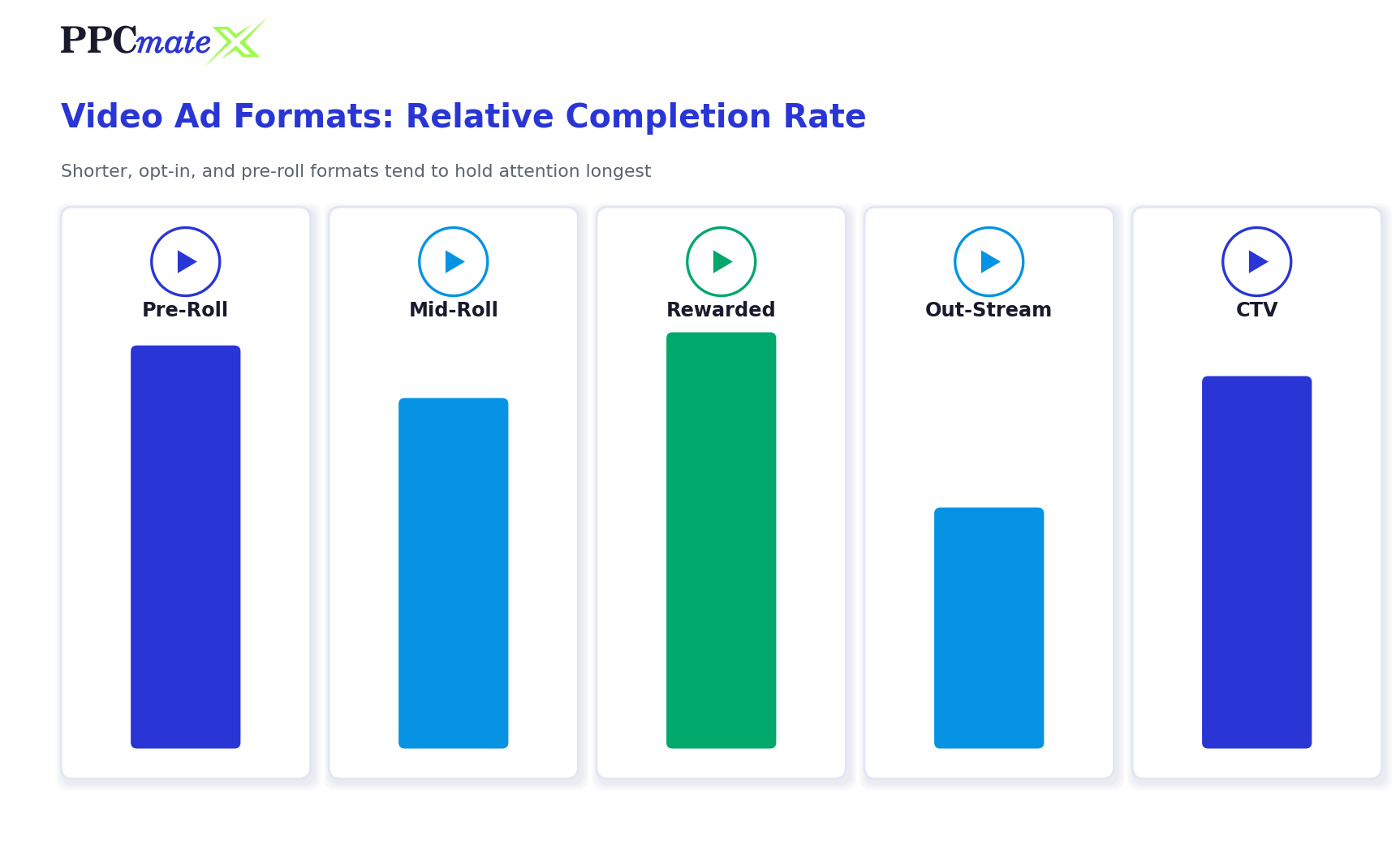
- In-stream pre-roll – plays before the main video content, the most common and highest-completion format
- In-stream mid-roll – plays during a content break, common in longer-form video
- In-stream post-roll – plays after the content ends, lowest completion but cheapest
- Out-stream / in-feed video – plays inside a content feed or article, not tied to another video
- Rewarded video – common in apps and games, users opt in for an in-app reward
- Connected TV (CTV) – delivered to smart TVs and streaming devices, blending TV-style reach with programmatic targeting
Video Length and Completion Rates
Shorter creative (6-15 seconds) generally holds completion rate better than 30-second spots, especially on mobile and in-feed placements where users can skip after a few seconds. Match creative length to the placement, not the other way around.
How to Target Video Campaigns
- Start with device and environment
Decide whether the campaign runs on mobile, desktop, CTV, or a mix, since creative specs and completion behavior differ by environment. - Set content category targeting
Match video placements to content categories relevant to the offer, the same discipline covered in quality traffic targeting. - Layer geo and language
Narrow to the locations and languages that actually convert before scaling wider. - Apply frequency capping
Video fatigues quickly – cap views per user per day to avoid wasted repeat impressions. - Use dayparting where relevant
CTV and mobile video often have strong time-of-day patterns worth testing. - Layer in retargeting
Users who watched a significant portion of a video are a strong retargeting audience for a follow-up ad.
Video Ads Bidding Strategy
Video inventory is typically bought on a CPM or CPCV (cost per completed view) basis through real-time bidding, the same auction model used across programmatic formats.
- CPM works well for awareness goals where reach matters more than completion
- CPCV aligns spend with actual attention, since advertisers only pay for views that reach a completion threshold
- Raise bids on placements and sources with strong completion and viewability, not just low CPM
- Give new campaigns 48-72 hours of stable bidding before adjusting, since video auctions can take longer to normalize than display
Video Ad Format Comparison
| Format | Completion Rate | Best For |
| Pre-roll | Highest | Brand awareness, high-attention moments |
| Mid-roll | High | Longer-form content, engaged viewers |
| Out-stream / in-feed | Moderate | Broad reach, content-style placements |
| Rewarded video | Very high | App installs, in-app engagement |
| CTV | High | Broad household reach, TV-style branding |
Common Mistakes to Avoid
- Using the same creative length across every placement type
- Judging performance on views alone instead of completion rate and viewability
- Ignoring frequency capping, leading to fast creative fatigue
- Not testing CTV and mobile separately, since behavior differs significantly
- Scaling budget before completion and viewability data confirms placement quality
Ready to Run Video Campaigns With More Control?
PPCmate’s video ads platform gives advertisers format-level targeting, real-time bid controls, and completion-rate reporting from one self-serve dashboard, so video campaigns can be tested and scaled with the same discipline as display, native, and push.
FAQs
What are the main video ad formats?
The main formats are in-stream pre-roll, mid-roll, and post-roll, out-stream/in-feed video, rewarded video (common in apps), and connected TV (CTV) ads delivered to smart TVs and streaming devices.
How are video ads priced?
Video is typically bought on a CPM (cost per thousand impressions) or CPCV (cost per completed view) basis through real-time bidding auctions.
What video length performs best?
Shorter creative, roughly 6-15 seconds, tends to hold completion rate better than 30-second spots, particularly on mobile and in-feed placements where users can skip.
What is CPCV?
CPCV stands for cost per completed view – advertisers only pay when a viewer watches the video to a defined completion threshold, aligning spend more closely with actual attention than a flat CPM.
Is CTV the same as regular video advertising?
CTV runs through the same programmatic auction mechanics as other video formats, but it’s delivered to smart TVs and streaming devices rather than mobile or desktop browsers, which changes creative specs and typical viewing context.
Why does frequency capping matter more for video?
Video creative tends to fatigue faster than static formats because viewers process the full message on the first watch. Capping views per user per day keeps the same audience from seeing the same creative too often.
Can video campaigns be retargeted?
Yes. Users who watched a significant portion of a video are a strong retargeting audience for a follow-up ad, since partial or full completion signals real attention rather than an accidental impression.