Dayparting: How to Schedule Ads by Hour and Day of Week
Most campaigns spend money around the clock by default, yet the people you want to reach are not equally likely to click, sign up or buy at every hour. Dayparting lets you decide when your ads run and how hard they bid at different times, so budget flows towards the hours and days that actually pay. This guide explains what dayparting is, how to read your data before you touch a schedule, and how to build, test and maintain one without cutting off traffic you need.
What Is Dayparting in Advertising?
Dayparting (also called ad scheduling or time targeting) is the practice of limiting or adjusting ad delivery by hour of the day and day of the week. Instead of a flat 24/7 campaign, you tell the platform to run, bid higher, bid lower or pause during specific time blocks.
The idea comes from TV and radio, where airtime was always sold by daypart such as morning drive or prime time. In programmatic buying the same logic applies at a much finer level: you can look at results hour by hour and change delivery accordingly.
Dayparting vs. Flight Dates vs. Pacing
These three controls are often mixed up, but they answer different questions:
| Control | What it decides | Typical use |
| Dayparting | Which hours and weekdays the campaign runs, and at what bid | Focus spend on the hours that convert, pause the hours that do not |
| Flight dates | The calendar start and end date of the campaign | Promotions, seasonal offers, launches with a fixed window |
| Delivery pacing | How fast the daily budget is spent within the hours that are active | Avoid burning the whole budget early in the day, or deliver as fast as possible for short tests |
| Frequency capping | How often the same user sees your ad | Limit ad fatigue and wasted impressions on the same person |
Dayparting works best together with pacing. If you shrink the schedule to a few strong hours but leave pacing on accelerated, the budget can run out early in the first active block and never reach the later ones.
Why Time of Day Changes Campaign Results
Traffic is not uniform across the day. Several things shift from hour to hour, and each of them can move your cost per result:
- Who is online. Commuters, office workers, students and night-shift users browse at different times, and they respond to different offers.
- Device mix. Mobile share often rises in the evening and on weekends, which matters if your landing page or offer converts differently by device (see our guide on splitting budget between mobile and desktop).
- Competition in the auction. When more advertisers bid for the same inventory, prices go up. Quieter hours can be cheaper, but cheaper is only useful if those users also convert.
- Intent and attention. A user scrolling late at night may be more relaxed and more willing to read a long pre-lander, while a lunchtime visitor may only skim.
- Business hours on your side. If a lead needs a phone call or live chat, leads that arrive when nobody can answer them are worth less.
- Traffic quality. Some sources show more suspicious activity at certain hours. A traffic quality score can help you tell genuine low-intent hours from hours where bots are inflating clicks.
None of these patterns are universal. Two advertisers running the same format in the same country can see opposite peaks, which is why dayparting must come from your own data rather than from a generic “best time to advertise” list.
How to Set Up Dayparting Step by Step
A good schedule is built from evidence, not guesses. Follow these steps in order:
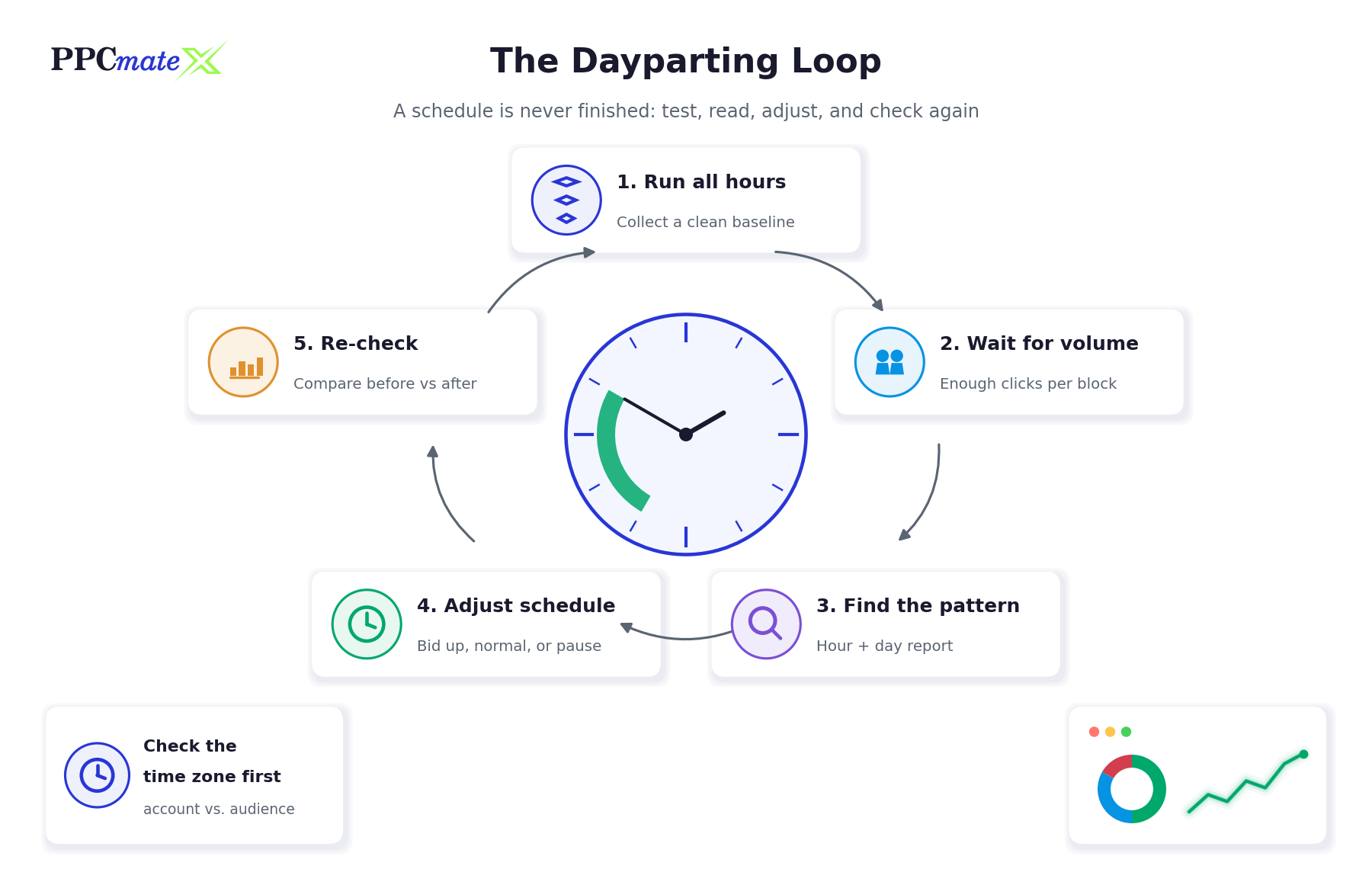
- Confirm the time zone. Check which time zone your account reports and schedules in, and which time zone your audience lives in. A schedule set in the wrong zone shifts every block by several hours.
- Run a baseline on all hours. Launch the campaign without a schedule so every hour and weekday gets a fair chance. Without this step you cannot know what you are cutting.
- Collect enough volume. Wait until each time block has received enough clicks and conversions to compare. One or two conversions in a block is noise, not a pattern.
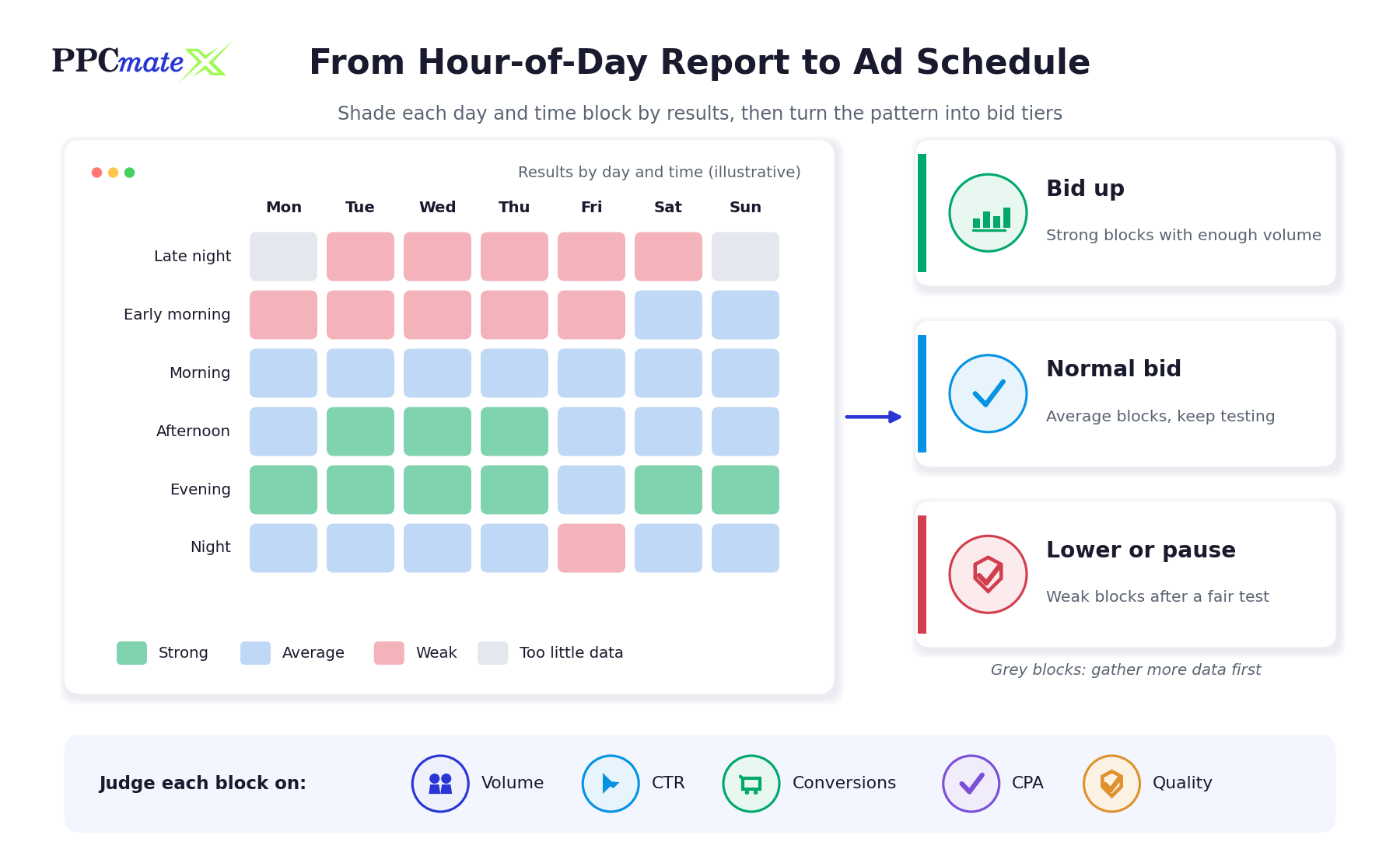
- Group hours into blocks. Single hours are usually too thin. Group them into blocks such as early morning, morning, afternoon, evening and night, and compare weekdays with weekends.
- Measure each block against your target. Compare cost per acquisition and return with the numbers that keep you profitable. If you have not worked those out yet, start with our guide to break-even CPA and ROI.
- Sort blocks into tiers. Strong blocks with enough volume get a higher bid, average blocks stay at the normal bid, and blocks that stay weak after a fair test get a lower bid or are paused.
- Apply the schedule and adjust pacing. Set the active hours in the campaign, then check that your pacing setting still spreads the budget across the blocks you kept.
- Re-check after the change. Compare the new period with the baseline. Removing hours changes how the remaining hours behave, so the schedule needs a second look.
Reading Hour-of-Day and Day-of-Week Data
Look at the Right Metrics
Clicks and CTR tell you when people are paying attention. Conversions, CPA and revenue tell you when that attention turns into money. Judge each block on the second group. A block with a high CTR and no conversions is usually curiosity, accidental clicks or poor-quality traffic, not a reason to bid more.
Combine Time With Source Data
Hour-level averages can hide the real cause. If one source sends most of its weak traffic at night, pausing the whole night removes good traffic from every other source too. Before cutting a block, break it down by source and placement. Our guide on how to read a source-level report shows how to spot the sources that pull an average down.
Watch for Conversion Delay
Many offers do not convert on the first visit. A user who clicks in the evening might buy the next morning, and the conversion is often credited to the time of the click, not the purchase. If your tracking attributes conversions to the conversion time instead, evening traffic can look weaker than it really is. Know which timestamp your report uses before drawing conclusions.
Separate Weekdays From Weekends
Weekends often behave like a different campaign. Compare Saturday and Sunday as their own group before blending them into a single daily pattern.
Dayparting by Traffic Format
The same principles apply across formats, but each one has its own quirks:
- Push notifications: delivery depends on when subscribers are online to receive the message, so active hours can matter more than for other formats.
- Pop-under: volume is usually high around the clock, which makes it easier to gather enough data per block quickly.
- Native and display: results tend to follow the browsing habits of the publisher’s audience, such as news readers in the morning or entertainment sites in the evening.
- Video: longer sessions and viewing habits can shift results towards evenings and weekends, but check completion rates and conversions, not only views.
If you test several offers at once, keep the schedule the same across them while testing, otherwise you cannot tell whether the offer or the time window made the difference. Our guide on structuring campaigns when testing multiple offers covers this in more detail.
Bid Adjustments vs. Pausing Hours
Switching hours off is the bluntest form of dayparting. Bid adjustments are often the better first move:
- Lowering the bid in a weak block keeps some traffic flowing, so you keep learning and keep cheaper conversions that still meet your target.
- Raising the bid in a strong block can win more of the best impressions, but only up to the bid that still leaves you a margin.
- Pausing makes sense when a block stays clearly unprofitable after a fair test, or when the business cannot handle leads at that time.
Change one thing at a time. If you adjust the schedule, the bid and the creative in the same week, you will not know which change moved the results.
Common Mistakes to Avoid
- Scheduling before you have data. Guessing the “right” hours at launch removes the very hours you might have discovered work best.
- Judging blocks on too little volume. A block with a handful of clicks will look extreme in either direction. Wait for enough data or group hours into bigger blocks.
- Ignoring the time zone. A schedule in the account’s time zone while your audience lives several hours away moves every decision to the wrong part of the day.
- Cutting too many hours at once. Shrinking the schedule sharply can starve the campaign of volume and push up costs in the remaining hours as you compete for less inventory.
- Forgetting pacing. A tight schedule combined with fast delivery can spend the budget in the first active hour.
- Optimising on clicks instead of conversions. High-CTR hours are not automatically profitable hours.
- Setting it and forgetting it. Seasons, holidays, daylight saving changes and new sources all shift patterns. Review the schedule regularly.
Dayparting Checklist
- Time zone confirmed for both account and audience
- Baseline run on all hours and weekdays
- Enough clicks and conversions per time block
- Blocks judged on CPA and return, not just CTR
- Weak blocks checked by source before cutting
- Bid tiers applied before switching hours off
- Pacing checked after the schedule change
- Results compared with the baseline after the change
Schedule Your Campaigns on PPCmate
PPCmate is a self-serve DSP for display, native, video, push and pop-under traffic. Its campaign tools include traffic dayparting to run ads during specific times or days, delivery types from accelerated to even-paced, and campaign flight dates, so you can combine scheduling, pacing and start and end dates in one place. See the full feature list on the PPCmate platform page.
FAQs
What is dayparting in advertising?
Dayparting is scheduling ads so they run, bid higher, bid lower or pause during specific hours of the day and days of the week. It moves budget towards the time blocks where your campaign performs best.
Is dayparting the same as ad scheduling?
Yes. Dayparting, ad scheduling and time targeting all describe controlling when ads are delivered. Some platforms also let you change bids per time block instead of only turning hours on or off.
When should I start dayparting a new campaign?
After the campaign has run on all hours long enough for each time block to collect meaningful clicks and conversions. Scheduling on day one means you never see the hours you excluded.
How much data do I need before changing my ad schedule?
Enough that each time block has a stable number of conversions rather than one or two. If single hours are too thin, group them into larger blocks such as morning, afternoon and evening.
Should I pause bad hours or lower bids?
Lowering bids is usually the safer first step because it keeps some traffic and data coming in. Pause a block only when it stays unprofitable after a fair test or when you cannot handle leads at that time.
Does dayparting work for push and pop-under traffic?
Yes. The same method applies to every format: run a baseline, compare results by hour and weekday, then adjust. High-volume formats such as pop-under often reach a usable sample faster.
Which time zone does my ad schedule use?
It depends on the platform and account settings. Check the time zone used for scheduling and reporting before you build a schedule, and convert to your audience’s local time where they differ.
How often should I review my dayparting schedule?
Review it after every major change to the campaign and on a regular cycle, as well as around holidays and daylight saving changes, since audience habits and competition shift over time.