How to Structure Campaigns When Testing Multiple Offers
Testing several offers at once is how most affiliates and media buyers find a winner, but the way the test is built decides whether the result means anything. Put offers in campaigns with different geos, bids and sources, and you end up comparing the traffic rather than the offers. This guide shows a campaign structure that keeps offer tests fair, how to split budget between offers, how to read the results, and when to scale, keep testing or cut.
Why Campaign Structure Matters in Offer Testing
An offer test asks one question: given the same audience, which offer earns more? Every other setting that differs between the offers adds a second, hidden question. If Offer A runs on mobile in one country and Offer B runs on desktop in another, a better result for A could come from the offer, the device, the country or the bid. You cannot separate them afterwards.
Good structure solves this before any money is spent. It keeps the traffic side identical, lets only the offer change, and makes the reporting line up so each offer can be read on its own row. It also makes the next step easier: a winning offer can be moved into its own campaign without rebuilding anything, and a losing one can be paused without disturbing the rest.
The Building Blocks: Campaign, Offer, Creative and Source
Most self-serve DSPs and ad networks organise spend in a similar hierarchy. Knowing which level controls what is the first step to a clean test.
Campaign level: the traffic you buy
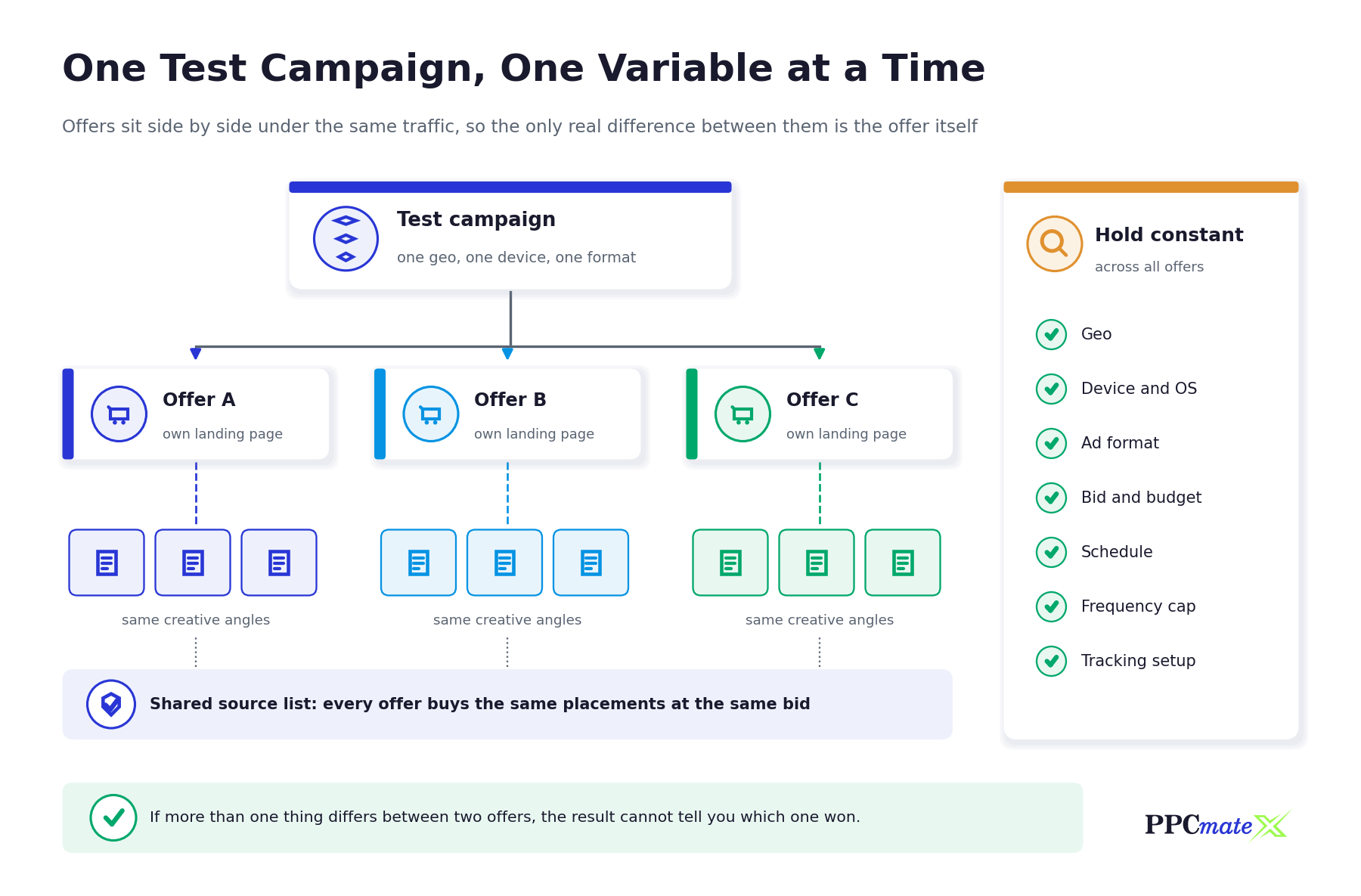
The campaign holds the settings that define the audience and the cost: geo, device and operating system, ad format, bid, budget, schedule and frequency cap. In an offer test, these are the settings you hold constant.
Offer level: what you are testing
The offer is the product, payout and landing page the traffic is sent to. Each offer should have its own destination URL with its own tracking parameters, so conversions are attributed to the right offer and not mixed in one bucket.
Creative level: how you present it
Creatives are the banners, native units, push messages or pop-under landing pages that carry the click. When the goal is to compare offers, use the same creative angles for each offer, changing only what the offer requires (name, product image, price point).
Source level: where the impressions come from
Sources are the sites, apps, zones or publisher IDs that deliver the traffic. Source performance varies widely, which is why every offer in a test should buy from the same source list. Our guide on how to read a source-level report explains how to judge sources once data comes in.
Three Ways to Structure a Multi-Offer Test
There is no single correct layout. The right one depends on the platform you use, the budget available, and whether you also need to test traffic settings. The table below compares the three common setups.
| Structure | How it works | Best for | Watch out for |
| One campaign, offers rotated | A single campaign sends traffic to a tracker that rotates offers evenly behind one link | Small budgets and fast first reads where the platform cannot split by offer | Needs a tracker with offer rotation; the platform report shows one line, so you must read results in the tracker |
| One campaign per offer, cloned settings | Duplicate the campaign for each offer, change only the destination URL, keep every other setting identical | Clear platform-side reporting and independent budget control per offer | Settings drift if one copy is edited later; keep a checklist and change all copies together |
| Offer by traffic-segment grid | Separate campaigns for each offer and each segment, such as mobile and desktop | Larger budgets where both the offer and the segment are unknown | Budget spreads thin quickly; every extra cell needs its own data before it can be judged |
For most buyers, cloned campaigns with one offer each is the clearest starting point. Rotation inside a tracker is a good option when budget is tight. The grid is only worth building once you have the budget to fill every cell.
How to Set Up a Fair Offer Test Step by Step
- Pick one traffic slice. Choose a single geo, device type and ad format for the test so traffic quality is comparable between offers.
- Choose two to four offers. More offers need more budget before any one of them can be judged. Start small and add offers in a later round.
- Set up tracking for each offer. Give every offer its own link in your tracker and make sure conversions come back by postback. See our walkthrough on postback tracking for Voluum, RedTrack and Binom.
- Build one campaign and clone it. Finish all targeting, bidding, schedule and frequency settings once, then duplicate the campaign for each offer and change only the destination URL and offer-specific creative details.
- Attach the same source list. Use one shared whitelist or blacklist across all copies so every offer buys the same placements. Our guide to whitelist vs blacklist targeting covers how to build one.
- Set equal daily budgets. Give each offer the same budget and bid so none of them wins simply by buying more or better-placed traffic.
- Name everything consistently. Use a pattern such as test name – geo – device – format – offer so campaigns sort together and reports are easy to filter.
- Write down your decision rule before launch. Decide in advance how much spend or how many conversions each offer needs before you judge it, and what result counts as a winner.
How to Split Budget Between Offers
Equal budgets are the default for a fair first read. Unequal budgets make results harder to compare, because the offer with more spend usually reaches deeper into lower-quality inventory as well as better placements.
A practical way to size the test is to work backwards from the offer payout. If you want each offer to have a reasonable chance to produce several conversions, its test budget has to cover several times its payout. Offers with high payouts and low conversion rates need more budget to read than offers with low payouts and frequent conversions.
- Keep bids equal during the test. A higher bid on one offer wins better placements and skews the comparison.
- Cap frequency the same way for every offer. Different caps change how often the same user sees an ad, which affects conversion rate. Our guide to frequency capping explains the trade-off.
- Run offers over the same days and hours. Weekday, weekend and time-of-day effects are real, so start and stop the test together.
- Leave a reserve. Keep part of the budget back to give a promising offer a second round before scaling.
Reading the Results and Deciding What to Keep
Once each offer has passed the spend or conversion threshold you set in advance, compare them on the metrics that reflect money, not attention. Clicks and click-through rate describe the creative and the traffic; conversions, cost per conversion and revenue per click describe the offer.
Compare on profit metrics
Rank offers on cost per acquisition against payout, or on return on ad spend if your tracker reports revenue. An offer with a lower conversion rate can still win if its payout is high enough.
Check the source mix behind each result
Even with a shared source list, delivery can drift. Before declaring a winner, check that each offer received traffic from a similar mix of sources. If one offer’s conversions came mostly from one source, the source may be the real driver.
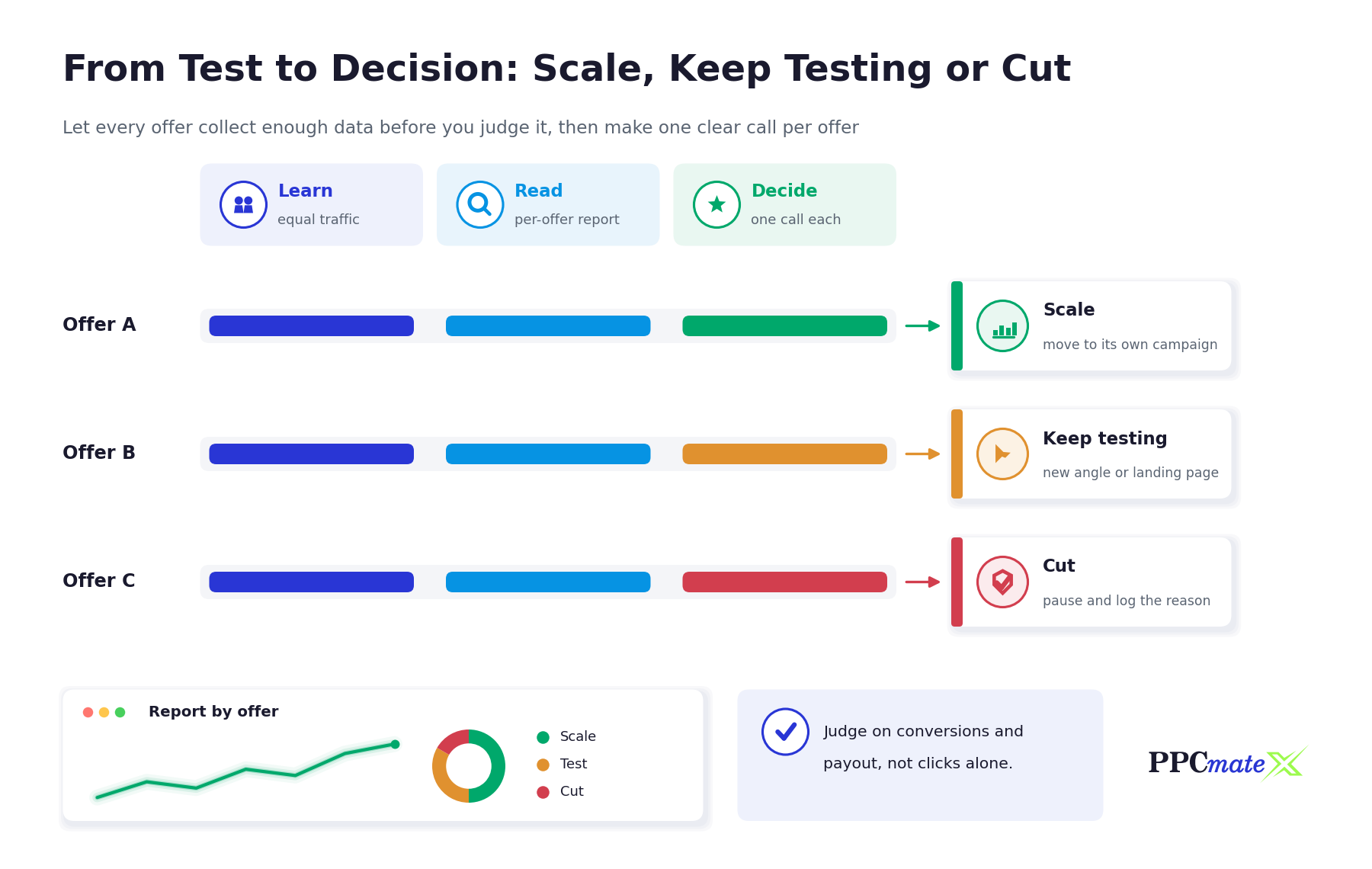
Make one call per offer
Every offer should leave the test with one of three outcomes: scale it, keep testing it with a new angle or landing page, or cut it and record why. Writing the reason down saves you from retesting the same losing setup months later.
Scaling a Winning Offer Without Breaking the Test
When an offer wins, move it into its own campaign rather than raising the budget inside the test. That keeps the original test readable and gives the winner room to grow.
- Clone the winning campaign and keep the settings that produced the result.
- Raise budget in steps rather than all at once, and watch cost per conversion after each step.
- Widen one dimension at a time: add a new geo, device or format in a separate campaign so each expansion can be judged on its own.
- Keep pruning sources that spend without converting, and add new sources gradually.
- Keep a small test campaign running so you always have a challenger ready if the winner fades.
For help choosing which formats to expand into, see our guide on the best traffic sources for CPA and affiliate offers.
Common Mistakes to Avoid
- Changing more than one thing at a time. Testing a new offer, a new geo and a new creative together makes the result impossible to attribute.
- Judging too early. A few early conversions can come from chance. Wait until each offer has reached the threshold you set before launch.
- Using different source lists per offer. If offers buy from different placements, you are comparing sources, not offers.
- Optimising on click-through rate. High CTR with no conversions usually means the creative attracts curiosity the offer cannot turn into sales.
- Editing one cloned campaign and forgetting the others. Settings drift silently. Change all copies together or not at all.
- Missing or broken conversion tracking. If postbacks do not fire for one offer, it will look like a loser when it may not be. Test every postback before launch.
- Scaling inside the test campaign. Raising budget mid-test changes the traffic mix and invalidates the comparison.
Running Offer Tests on PPCmate
PPCmate is a self-serve DSP for display, native, video, push and pop-under traffic, and its campaign setup supports the structure described above. Campaigns are created through a guided form whose steps run from Campaign and Creatives through Finance, Scheduling, Targeting, Inventory, Quality and Rules, so the settings you need to hold constant sit in one place. Source Lists let you keep one whitelist or blacklist and apply it across every campaign in a test, and changes to the list follow through to each campaign that uses it, as described in PPCmate’s 22 October 2026 release notes. Conversions can be measured by pixel or postback, with integrations for common affiliate trackers listed on the conversion trackers page.
If you run affiliate offers and want a structured way to test and scale them, see how PPCmate helps you maximize affiliate earnings.
FAQs
How many offers should I test at once?
Two to four offers is a practical range for most budgets. Each extra offer needs its own share of budget before it can be judged, so testing too many at once slows every decision.
Should each offer have its own campaign?
In most cases, yes. One campaign per offer with identical settings gives clear platform-side reporting and independent budget control. Rotating offers inside a tracker behind one campaign is a valid alternative when budget is small.
What should stay the same across offers in a test?
Geo, device and operating system, ad format, bid, budget, schedule, frequency cap, source list and tracking setup. Only the offer and its landing page should change.
How much budget does an offer test need?
Enough for each offer to produce several conversions at its expected cost. A common starting point is to give each offer a test budget equal to several times its payout, then adjust once early data arrives.
How long should an offer test run?
Until each offer has reached the spend or conversion threshold you set before launch, and ideally across a full week so weekday and weekend patterns are included.
Which metric decides the winning offer?
Profit metrics such as cost per acquisition compared with payout, or return on ad spend. Click-through rate alone does not show whether an offer makes money.
What should I do with an offer that almost wins?
Keep testing it with one change, such as a new creative angle or landing page, in a fresh round. Do not raise its budget inside the original test.
Can I test offers and traffic sources at the same time?
Only if you have the budget to give every offer and source combination enough data. Otherwise, test offers on a fixed source list first, then expand sources for the winner.