How to Set Up Postback Tracking for Voluum, RedTrack, and Binom
Most media buyers do not lose money because they picked the wrong offer. They lose it because they cannot tell which placement produced the conversions they did get. Postback tracking is the plumbing that fixes that: a server-to-server handshake that carries one identifier from the ad click all the way to the conversion and back again, so every sale is credited to the exact source that paid for it. This guide walks through the setup end to end, then covers the tracker-specific details for Voluum, RedTrack, and Binom.
What Postback Tracking Actually Does
A postback (also called an S2S postback, or server-to-server tracking) is a plain HTTP request that one server sends to another to report that a conversion happened. Nothing runs in the browser, which is why postbacks keep working when pixels do not: no cookies to lose, no script to be blocked, no redirect chain to break on a slow mobile connection.
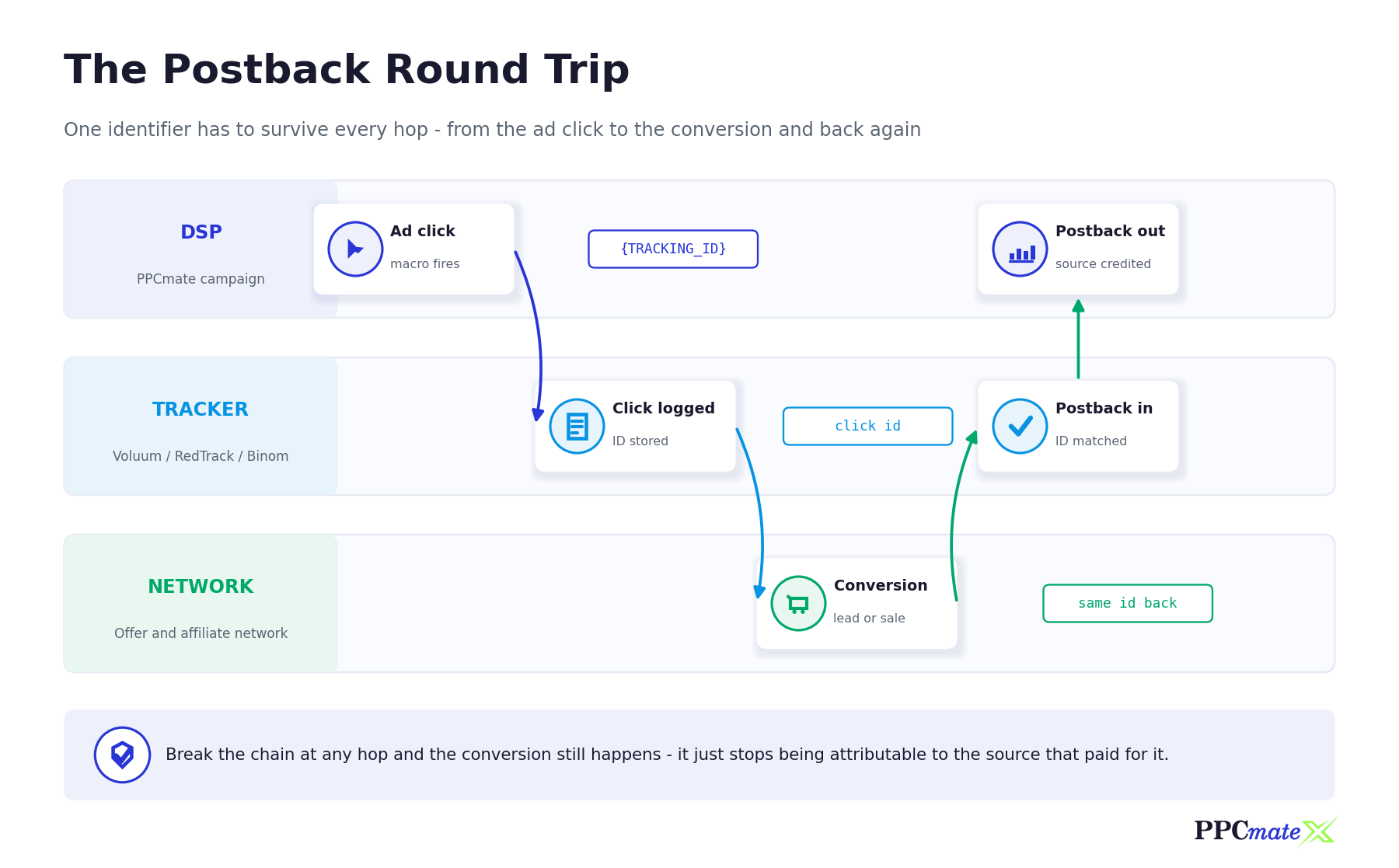
The mechanism is simple once you see it as a relay. Your DSP generates a unique identifier for every click and passes it to your tracker. Your tracker stores it and passes its own identifier to the affiliate network. When the user converts, the network calls your tracker with that identifier, and your tracker calls your DSP with the original one. The conversion lands back on the exact click, campaign, creative, and placement that generated it.
Why the identifier matters more than the tracker
Every tracker on this list does the same job. What differs is the name each one gives to the identifier it stores and the identifier it sends. Nearly every broken setup traces back to one of those names being wrong, missing, or pointed at the wrong field. Get the identifier right and the rest of the configuration is mechanical.
Postback vs pixel: when to use which
A conversion pixel fires in the user’s browser on a thank-you page. A postback fires server to server, triggered by the network. Pixels are easier to install when you own the landing page and do not need the network involved. Postbacks are the right choice whenever the conversion happens somewhere you do not control, which is the normal case in affiliate and CPA buying.
The Setup Sequence That Works for Any Tracker
Do these in order. The most common cause of a dead postback is starting at step four and working backwards.
- Add your traffic source in the tracker. Create a traffic source entry for your DSP and tell the tracker which URL parameter will carry the DSP’s click identifier. This is the field that everything else depends on.
- Build the campaign URL in the tracker. The tracker gives you a campaign link containing placeholders for the data you want to pass in, such as the click identifier, the placement, and the creative.
- Put that link in your DSP creative and fill the placeholders with DSP macros. In PPCmate, the destination URL goes in the creative, and macros such as
{TRACKING_ID},{SITE_ID},{CAMPAIGN}, and{BANNER}are replaced at click time with real values. - Copy the tracker’s conversion postback URL into the affiliate network. The network fires this URL when a conversion is approved, substituting its own click identifier into the parameter the tracker expects.
- Point the tracker back at the DSP. Add the DSP’s conversion postback URL in the tracker’s traffic source settings, using the tracker token that returns the original DSP click identifier. This step is the one most people skip, and it is the one that makes source-level optimization possible.
- Fire a test conversion before you spend. Trigger one manually, end to end, and confirm it appears in both the tracker and the DSP with a real placement attached.
Where PPCmate fits in the chain
PPCmate passes a unique {TRACKING_ID} value on every click, and accepts a conversion postback back from your tracker. You can find the exact postback URL for your account inside the platform, and the 3rd party tracking page lists the tools that integrate directly, including Voluum, Google Analytics, AppsFlyer, Adjust, and Branch. If you would rather pass placement data into an analytics tool instead of a tracker, the same macros work in UTM parameters, as covered in the guide to tracking PPCmate traffic KPIs in Google Analytics.
Tracker-Specific Setup: Voluum, RedTrack, and Binom
The sequence above is identical for all three. What changes is the vocabulary. Below is what each tracker calls the moving parts, and where in its interface you configure them. Always confirm the current parameter names against your tracker’s own documentation before going live, since trackers do revise them between versions.
Voluum
Voluum uses cid as the parameter name for its click identifier on an inbound conversion postback, alongside payout for the conversion value and txid for a transaction identifier. The postback URL you give your affiliate network takes the shape https://your-voluum-domain.com/postback?cid= followed by the network’s own click identifier placeholder.
To send conversions back to your DSP, open the traffic source entity and use the Advanced Parameters section. Voluum’s {externalid} token holds the traffic source’s click identifier, which is the value that needs to land back in PPCmate. Other tokens such as {payout}, {campaign.id}, and {transaction.id} are available if you want to enrich the postback further.
RedTrack
RedTrack keeps two identifiers per click: the one your traffic source supplied and the one RedTrack generated itself. The parameter that stores the traffic source’s identifier is {ref_id}, and RedTrack’s own identifier is {clickid}. Knowing which is which is the whole game here, because the two point in opposite directions.
Your affiliate network calls RedTrack at https://your-tracking-domain.com/postback?clickid= plus the network’s placeholder, with {sum} available to pass the payout. The postback you send back to the DSP should carry {ref_id}, since that is the value PPCmate originally issued. RedTrack also provides a way to test the traffic source postback from inside the interface, which is worth using before you launch.
Binom
Binom handles both clicks and conversions through click.php. The inbound conversion postback uses cnv_id to receive the click identifier from the affiliate network, with payout for the value and cnv_status for the conversion status, which is useful when a network reports leads and approved sales separately.
For the return trip, Binom lets you configure S2S postback in two places: the Postback URL field when editing the traffic source, and Advanced Settings inside the campaign itself. Both fire if both are set, so pick one and be deliberate about it. The token that returns the traffic source’s original click identifier is {externalid}.
Side-by-side comparison
| Setup element | Voluum | RedTrack | Binom |
| Inbound conversion parameter | cid | clickid | cnv_id |
| Payout parameter | payout | sum | payout |
| Token holding the DSP click ID | {externalid} | {ref_id} | {externalid} |
| Where the return postback is configured | Traffic source, Advanced Parameters | Traffic source postback settings | Traffic source Postback URL, or campaign Advanced Settings |
| Conversion status handling | Handled through conversion types and transaction IDs | Handled through conversion statuses and postback parameters | Status-postback relation, via cnv_status |
Verify Before You Scale
A postback that has never been test-fired is an assumption, not a measurement. Spending real budget on an untested setup means every number you optimise against for the next few days may be wrong, and the damage compounds because you will make cutting decisions from it.
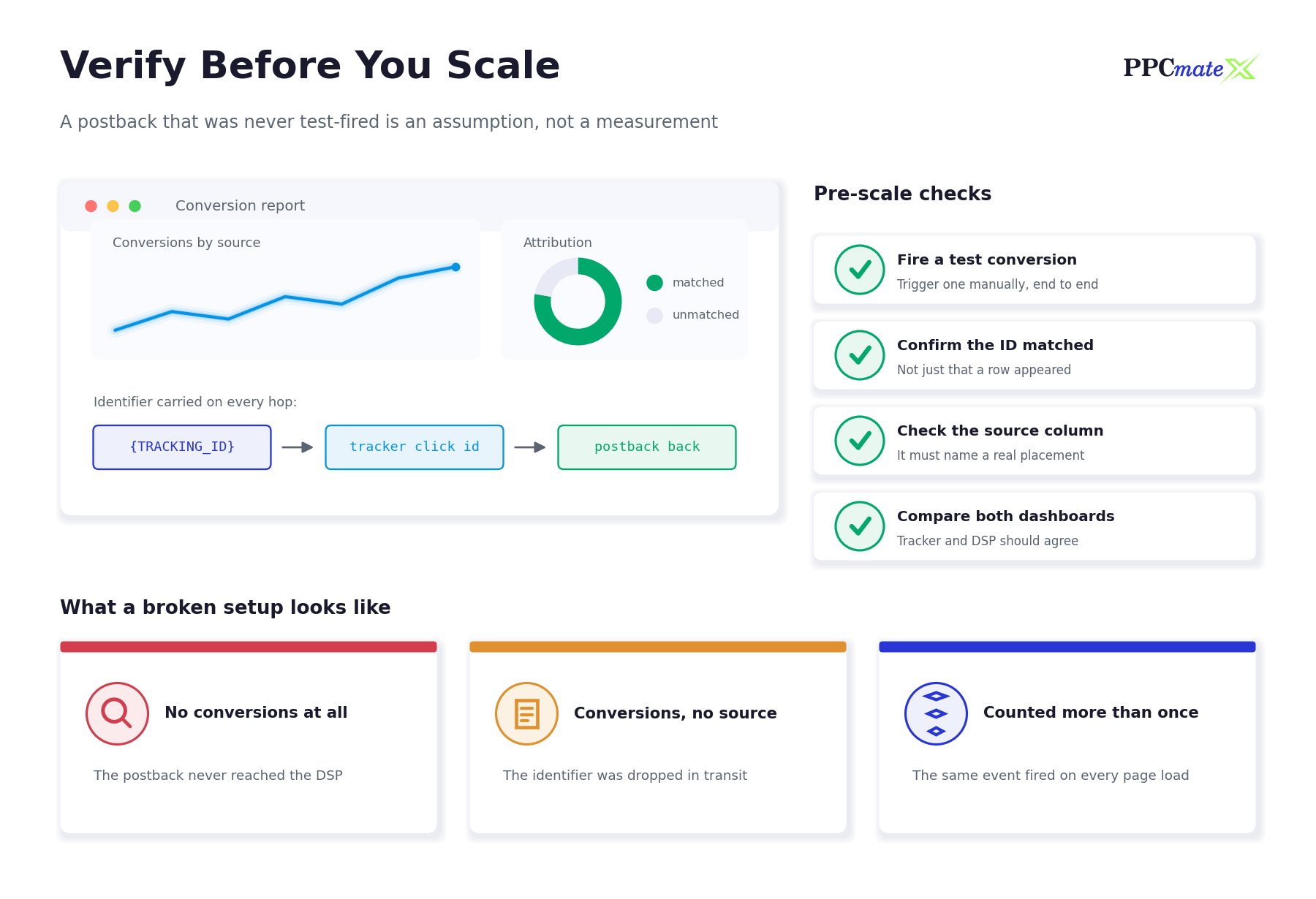
- Fire one conversion manually. Click your own ad, go through the funnel, and convert. Watching the identifier survive the full round trip once is worth more than any amount of configuration review.
- Check that the identifier matched, not just that a row appeared. A conversion row with an empty source column means the postback arrived but the identifier did not, which is a different problem with a different fix.
- Confirm the source column names a real placement. If every conversion attributes to the same generic value, a macro is not being replaced.
- Compare both dashboards. Your tracker and your DSP should agree on the count. Small timing differences are normal; a large persistent gap is not.
- Re-test after any URL change. Editing a creative’s destination URL is the single most common way a working setup quietly stops working.
What a broken setup looks like
Three failure patterns cover most cases. No conversions at all usually means the postback never reached its destination, so start at the network and work forward. Conversions with no source means the identifier was dropped somewhere in transit, most often because a placeholder was left unfilled or the parameter name does not match on both ends. Conversions counted more than once means the same event is firing repeatedly, typically because a postback sits on a page the user can reload.
Turning Postback Data Into Optimization Decisions
Working attribution is not the goal in itself. The goal is being able to cut what loses and scale what works, at the placement level rather than the campaign level.
- Let a source accumulate enough clicks to mean something before judging it. Cutting on a handful of clicks removes sources that were never measured, not sources that failed.
- Separate a source producing no conversions from a source producing conversions at a bad cost. They call for different actions.
- Build your exclusion list from data you can defend. The approach is covered in detail in the guide to whitelist vs blacklist targeting.
- Read the source-level report on a regular cadence rather than reacting daily, using the method in how to read a source-level report and decide what to cut.
- Check whether a source’s conversions look human before scaling it. Bot traffic and low-quality traffic leave different fingerprints, and postback data helps distinguish them.
Frequency and creative data travel on the same rails
Because the identifier carries campaign and creative values as well as the click, a working postback setup also lets you see which creative converts and how repeat exposure affects results. That pairs naturally with frequency capping, which limits how often the same user sees the same ad.
Common Mistakes to Avoid
- Launching before the test conversion. Every hour of spend on an untracked campaign is data you cannot recover later.
- Mismatched parameter names. The name in the postback URL and the name the receiving system expects must be identical, including case.
- Confusing the tracker’s own click ID with the traffic source’s. Sending the tracker’s identifier back to the DSP produces rows that never match. RedTrack makes this distinction explicit with
{ref_id}versus{clickid}. - Forgetting the return postback. Conversions in your tracker but not in your DSP means the DSP cannot optimise, and you are left doing placement analysis by hand.
- Passing the macro literally. Seeing the macro text itself in your reports, rather than a value, means it was placed somewhere the platform does not substitute it.
- Duplicate postbacks on reloadable pages. Inflated conversion counts lead to bid increases on sources that do not deserve them.
- Never re-testing. Creative edits, domain changes, and network migrations all break working setups silently.
Run Tracked Campaigns on PPCmate
PPCmate is a self-serve DSP with display, native, video, pop-under, and push inventory, built for advertisers who buy on measured outcomes rather than raw volume. Campaigns support S2S postback tracking, granular geo, device, OS, and connection targeting, and source-level reporting you can act on. If you are running CPA or affiliate offers, the affiliate earnings page covers how the platform fits that workflow, and the 3rd party tracking page shows the integrations available. For a broader view of which format suits which offer type, see best traffic sources for CPA and affiliate offers.
FAQs
What is postback tracking?
Postback tracking is a server-to-server method of reporting conversions. When a conversion happens, one server sends an HTTP request to another carrying a unique click identifier, so the conversion can be matched back to the original click, campaign, creative, and placement.
What is the difference between a postback and a conversion pixel?
A pixel fires in the user’s browser on a confirmation page and depends on cookies and scripts loading. A postback fires between servers and does not touch the browser, so it keeps working when cookies are blocked or scripts fail. Postbacks are the standard choice when the conversion happens on a page you do not control.
Which parameter does Voluum use for the click ID?
Voluum uses cid for the click identifier on an inbound conversion postback, with payout for the conversion value and txid for a transaction identifier. To send conversions back to a traffic source, Voluum provides the {externalid} token, which holds the traffic source’s own click ID.
What is the difference between {clickid} and {ref_id} in RedTrack?
{clickid} is the identifier RedTrack generates for the click. {ref_id} is the identifier your traffic source passed in. When sending a conversion postback back to the traffic source, use {ref_id}, because that is the value the traffic source will recognise.
How do I set up a traffic source postback in Binom?
Binom lets you set S2S postback either in the Postback URL field when editing the traffic source, or in Advanced Settings inside the campaign. Use the {externalid} token to return the traffic source’s original click ID. If both places are configured, both will fire.
Why are my conversions showing without a source?
The postback reached your platform but the click identifier did not arrive with it, so there was nothing to match against. The usual causes are an unfilled placeholder in the campaign URL, a parameter name that differs between the two systems, or a macro placed where the platform does not substitute it.
Do I need a tracker at all, or can I send conversions straight to the DSP?
You can send conversions directly from a network or your own server to the DSP if the network supports it. A tracker is worth adding when you run several offers or traffic sources at once, need landing page split testing, or want a single place to compare everything.
How do I test a postback before spending budget?
Click your own ad, complete the funnel, and trigger a real conversion. Then confirm it appears in both the tracker and the DSP with a genuine placement attached. Checking that the identifier matched is the part that matters, not simply that a conversion row exists.