This week’s PPCmate release is all about doing more in fewer clicks. The campaign form has been rebuilt as a clear, step-by-step timeline, viewability now sits right next to your clicks and spend, and Source Lists let you manage bids for the same sources across every campaign at once. Here’s what’s new and how to use it.
1. A new, guided campaign form
Creating a campaign now follows a numbered timeline: Campaign, Creatives, Finance, Scheduling, Targeting, Inventory, Quality and Rules. Each step opens on its own, and a Next button takes you to the next one. A side panel shows how far you’ve come and keeps Save in reach.
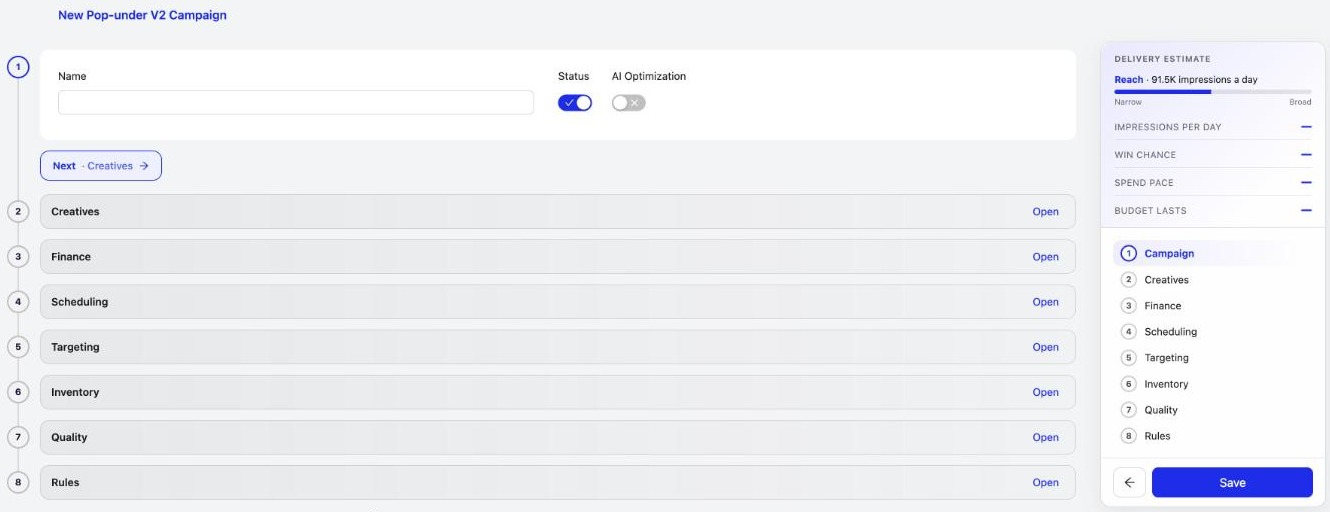
What else changed:
- If something needs fixing, the section it’s in lights up, so you’re never hunting for the error.
- The Campaign Checker opens after every save and closes itself when everything passes.
- Saved campaigns show plainly whether they’re Live, Paused or Blocked.
- New campaigns keep the status you set; nothing is paused behind your back.
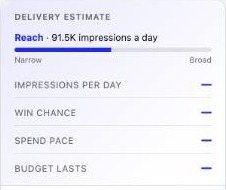
The side panel also has a clearer delivery estimate, with a reach meter from narrow to broad and the matching traffic shown from the very start:
2. Viewability, everywhere you look
Knowing your ads were actually seen matters as much as the click. Your Campaigns and Creatives lists now show Viewable % and average time in view for every row, with 5s+ and 30s+ in view one click away.

In Reports, a new Viewability group adds counts, rates, time in view and video completion, plus a ready-made Viewability view, so you can compare sources and placements by how long people really looked.
3. Reports, set up your way
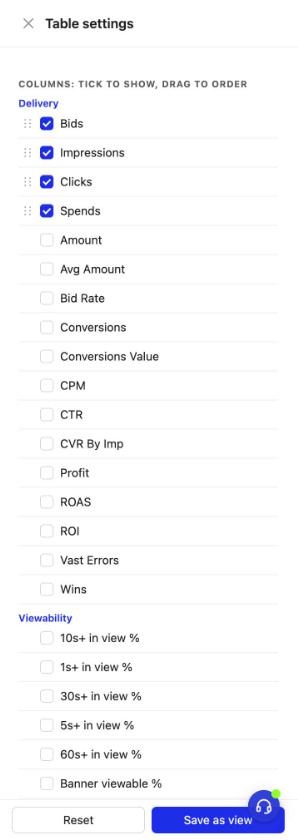
A new Table settings gear in Reports lets you tick the columns you want, drag them into your own order, change the row density, show totals and freeze columns. Save the result as a view and it’s there next time.
4. Source Lists: one list, every campaign
If you bid up the same good sources (or turn off the same bad ones) in many campaigns, Source Lists save you the copy-paste. Keep domains, site IDs and sub IDs in a list, with a bid change for each, up to 30,000 per list. Import them from a CSV with a preview before anything changes, then use the list in any campaign under Targeting › Source Bids. Change the list once and every campaign using it follows.

- Each campaign can now hold up to 2,000 Source Bids, four times more than before.
- Your rules can add a source to a list automatically when they change its bid.
5. More control on Meta, LinkedIn and Google
- Facebook, Instagram and LinkedIn campaigns now follow the days and hours you choose: PPCmate pauses and resumes them for you automatically.
- Google Search shows how many searches a month each keyword gets, right beside its bid range.
Also new
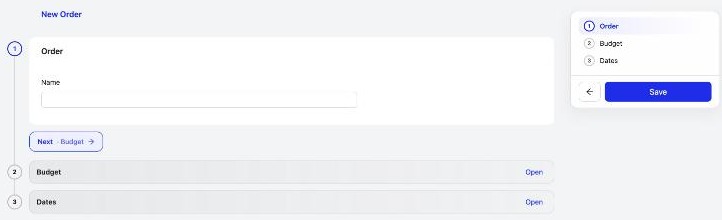
- Orders have a new look: a short timeline when you create one, and summary cards once it’s saved.
- The Campaign Checker spots an approved ad that’s switched off and offers a one-click Switch the ad on.
- A frequency cap of 1 per person is no longer flagged as a problem.
Frequently asked questions
What's new in PPCmate in the 22 October 2026 release?
A new step-by-step campaign form with a numbered timeline and a Campaign Checker after every save, viewability (Viewable % and time in view) on the Campaigns and Creatives lists and in Reports, Reports table settings, Source Lists for managing source bids across campaigns, up to 2,000 Source Bids per campaign, day-and-hour scheduling for Meta and LinkedIn, and searches per month for Google Search keywords.
How does the new PPCmate campaign form work?
Creating a campaign follows a numbered timeline: Campaign, Creatives, Finance, Scheduling, Targeting, Inventory, Quality and Rules. Each step opens on its own with a Next button, a side panel shows your progress and a delivery estimate, and the Campaign Checker runs after every save and shows whether the campaign is Live, Paused or Blocked.
What is ad viewability and where can I see it in PPCmate?
Viewability tells you whether an ad was actually seen on screen and for how long. PPCmate shows Viewable % and average time in view on every row of the Campaigns and Creatives lists, and Reports has a Viewability column group (counts, rates, time in view and video completion) with a ready-made Viewability view.
What are Source Lists in PPCmate?
Source Lists hold domains, site IDs and sub IDs with a bid change for each, up to 30,000 entries per list. You can import a list from CSV with a preview, use it in any campaign's Source Bids, and every campaign that uses the list follows when you change it. Rules can also add a source to a list automatically.
How many Source Bids can one PPCmate campaign have?
Each campaign can hold up to 2,000 Source Bids, four times more than before. For more sources, put them in a Source List, which holds up to 30,000 entries and can be shared by many campaigns.
Can PPCmate run Facebook, Instagram and LinkedIn ads only on certain days and hours?
Yes. Facebook, Instagram and LinkedIn campaigns follow the days and hours you set in Scheduling: PPCmate pauses and resumes them automatically.
How do I get PPCmate product updates first?
Join the PPCmate Telegram channel at t.me/ppcmate. Every release is posted there as soon as it ships, and all changes are listed in the release notes at ppcmate.com/releases.
Get updates first
Every PPCmate release goes to our Telegram channel the moment it ships. Join PPCmate on Telegram →
See every change in the release notes, or start a campaign and try the new form today.