Native Advertising Guide for Advertisers: Formats, Targeting, Bidding, Optimization & Examples
Native advertising lets advertisers place ads that match the look and feel of the content around them, instead of interrupting it. Done well, this builds more trust than a banner and earns more attention than a pop-under, which is why it has become a core format for advertisers who need users to read, click, and convert rather than just glance and leave.
This guide covers what native advertising is, the formats and placements available, how to set up targeting and bidding, and the mistakes that quietly waste budget on native campaigns.
What Native Advertising Means
Native advertising is paid content designed to match the visual style and format of the platform it appears on. A native ad on a news site looks like a recommended article. A native ad in a content feed looks like the next feed item. The promotional intent is disclosed (usually with a “Sponsored” or “Promoted” label), but the ad does not interrupt the page the way a pop-under or a display banner does.
This format works well for offers that need a moment of context before a click, such as:
- Content and advertorial-style offers
- Finance, health, and other considered-purchase verticals
- App installs and subscription products
- E-commerce and lead-generation funnels that benefit from a story-driven lead-in
Native Ad Formats and Placements
Native inventory is usually sold through a few recognizable placement types. Most campaigns mix more than one.
- In-feed native — appears inside a content or social feed, styled like the surrounding posts
- Content recommendation widgets — “You may also like” or “Around the web” units at the end of an article
- In-ad native — native creative served inside a standard ad slot, styled to match the page
- Search and listing native — sponsored listings styled like organic search or marketplace results
A platform built for DSP media buying lets advertisers run all of these placement types from one dashboard instead of negotiating with individual publishers.
Native Ad Creative: Title, Image, and Body Text
Most native units are built from three elements: a thumbnail image, a short title, and sometimes a brief description or brand name. Because the format leans on curiosity and context rather than a hard visual hook, copywriting carries more weight in native than in display.
Strong native titles usually:
- Read like an article headline, not an ad
- Set a specific expectation instead of a vague tease
- Match the tone of the publisher’s own content
- Avoid all-caps, excessive punctuation, or claims that trigger ad-fatigue skepticism
How to Target Native Campaigns
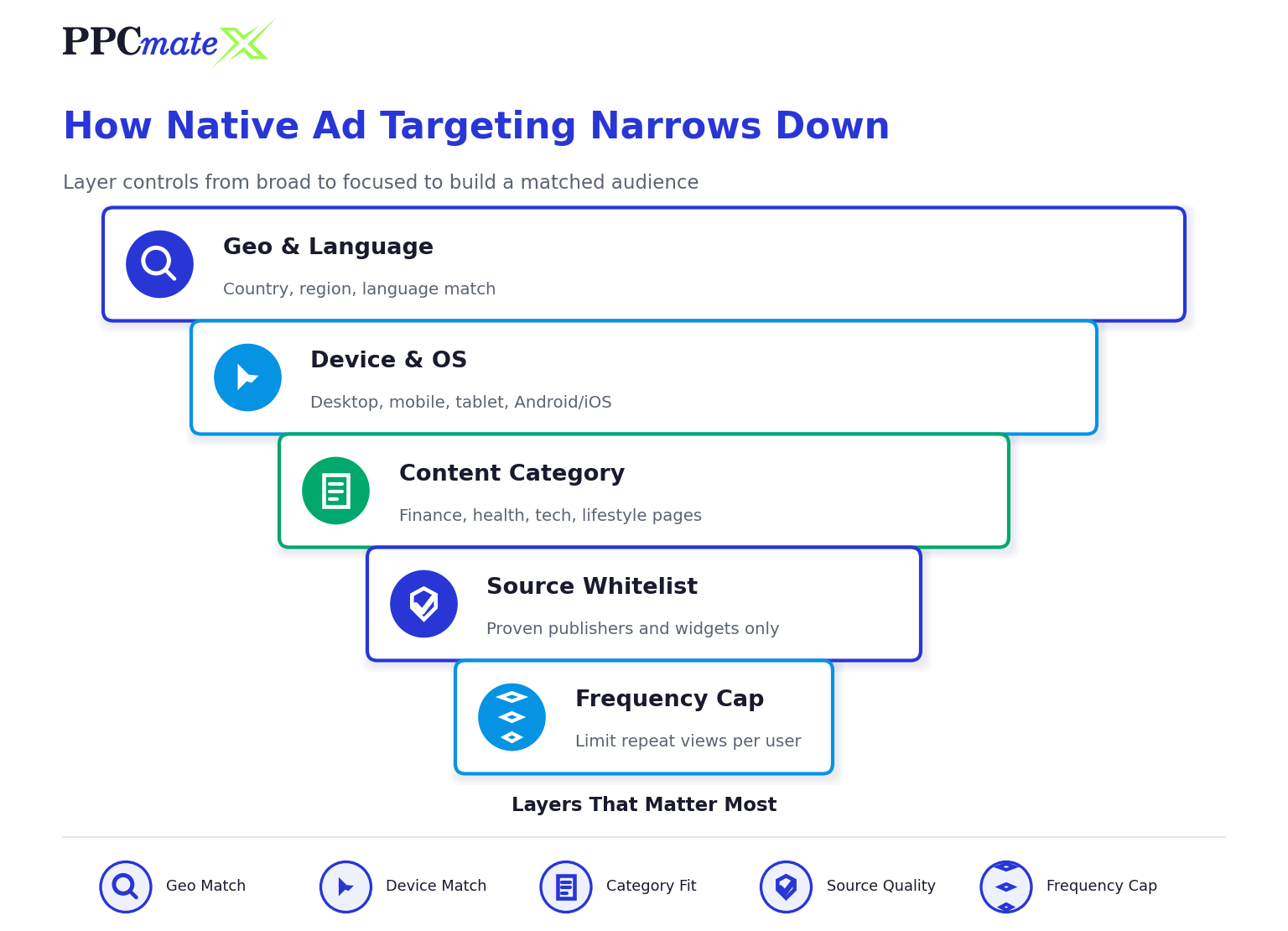
Native targeting works best when it is layered, the same discipline that applies to quality traffic targeting generally.
Step-by-Step Native Targeting Setup
- Choose your content categories first
Native performs best when the surrounding content matches the offer — finance offers on finance content, health offers on health content. - Set geo and language targeting
Match locations and languages to where the offer actually converts, not just where traffic is cheap. - Select device and OS
Native inventory skews mobile-heavy on many publishers; confirm your landing page is mobile-fast before scaling. - Whitelist strong sources early
Native widget networks include many publishers of very different quality — build a whitelist from what performs, don’t run broad indefinitely. - Use frequency capping
Native creative fatigues faster than display because titles get “read” once and lose curiosity value. - Layer in retargeting
Users who already clicked a native placement once convert at a higher rate on a second native touch.
Native Ads Bidding Strategy
Native inventory is typically bought on a CPC or CPM basis through real-time bidding, the same auction model used across programmatic formats.
A practical bidding approach:
- Start bids in the middle of the platform’s suggested range, not the floor — native auctions are competitive on well-trafficked widgets
- Give a new campaign 24–48 hours of stable bidding before adjusting, so the algorithm and the data have time to settle
- Raise bids only on sources with confirmed conversions, not on raw click volume
- Lower or pause bids on sources with high clicks but no downstream conversions
Native Ads vs Display Ads
| Focus Area | Native Ads | Display Ads |
| Visual style | Blends into page content | Stands out as a distinct banner |
| Best for | Considered-purchase, content-led offers | Awareness and retargeting |
| Speed to convert | Slower, trust-building | Faster, attention-driven |
| Creative weight | Title and copy carry more weight | Image and motion carry more weight |
| Fatigue rate | Faster — rotate titles often | Moderate |
For a closer look at the other format, see the Display Ads Guide. Many advertisers run both formats in parallel rather than choosing one, similar to how push ad campaigns often run alongside native for full-funnel coverage.
Common Native Advertising Mistakes to Avoid
- Using a display banner as native creative instead of a proper title-image-body unit
- Ignoring content-category match between the offer and the publisher’s page
- Running the same title across every source with no rotation
- Judging performance on clicks alone instead of post-click conversion, the same trap covered in how fake engagement distorts campaign performance
- Sending native clicks to a slow-loading or generic landing page
- Scaling spend before a source has proven conversions, not just volume
Ready to Run Native Campaigns With More Control?
PPCmate’s native ads platform gives advertisers layered targeting, real-time bid controls, and source-level reporting from one self-serve dashboard, so native campaigns can be tested, tracked, and scaled without juggling multiple publisher relationships.
FAQs
What is native advertising?
Native advertising is paid content styled to match the platform it appears on, such as an in-feed post or a content recommendation widget, so it blends in with organic content while still being disclosed as sponsored.
How is native advertising different from display advertising?
Display ads are visually distinct banners built for fast attention, while native ads are styled to match surrounding content and tend to build more trust before a click, making them better suited to considered-purchase offers.
What formats does native advertising include?
Common native formats include in-feed native, content recommendation widgets, in-ad native served in standard slots, and sponsored listings styled like organic search or marketplace results.
How are native ads priced?
Native inventory is typically bought on a CPC or CPM basis through real-time bidding auctions, the same model used across most programmatic ad formats.
Why does native creative fatigue faster than display?
Native titles rely on curiosity, and once a user has read a headline, it loses its pull even if they didn’t click. Rotating titles and images regularly keeps native campaigns performing.
What verticals perform best with native ads?
Finance, health, education, and other considered-purchase or content-led verticals tend to perform well with native, since the format gives users context before asking for a click.
Can native ads run alongside push or display campaigns?
Yes. Many advertisers run native alongside push and display to cover different funnel stages — push for fast top-of-funnel volume, native for trust-building, and display for awareness and retargeting.