Push ads help advertisers reach users with short, direct notification-style messages. They are simple to launch, easy to test, and useful for driving traffic, leads, installs, sales, and retargeting actions.
For media buyers, affiliates, e-commerce teams, and agencies, push ads offer a practical way to test offers across geos, devices, and traffic sources. The key is to use clear targeting, strong creatives, tracking, and steady optimization.
Key Takeaways
- Push ads are short notification-style ads used for direct response campaigns.
- Advertisers use push ads for traffic, app installs, leads, sales, and retargeting.
- Strong targeting helps reduce wasted spend.
- Creative testing is important because push ads have limited space.
- Campaigns should be optimized by source, device, geo, OS, time, and conversion data.
What Are Push Ads?
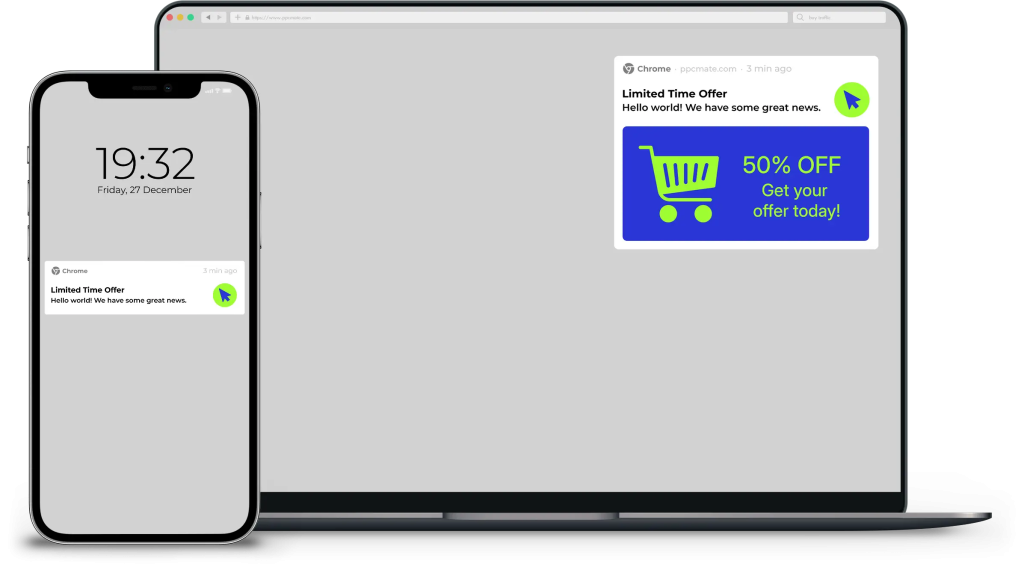
Push ads are digital ads that look like notifications.
They usually include:
- A title
- A short message
- An icon or image
- A call to action
- A landing page link
Push ads are designed to catch attention fast. They work best when the offer is easy to understand.
Advertisers can use push traffic campaigns to reach users across different devices, browsers, and traffic sources.
How Do Push Ads Work?
Push ads are served through a push ad network or programmatic ad platform.
The advertiser sets the campaign goal, targeting, budget, bid, and creative. The platform then shows the ad to users who match those settings.
When a user clicks the ad, they are sent to the advertiser’s landing page, app page, offer page, or lead form.
Main Types of Push Ads
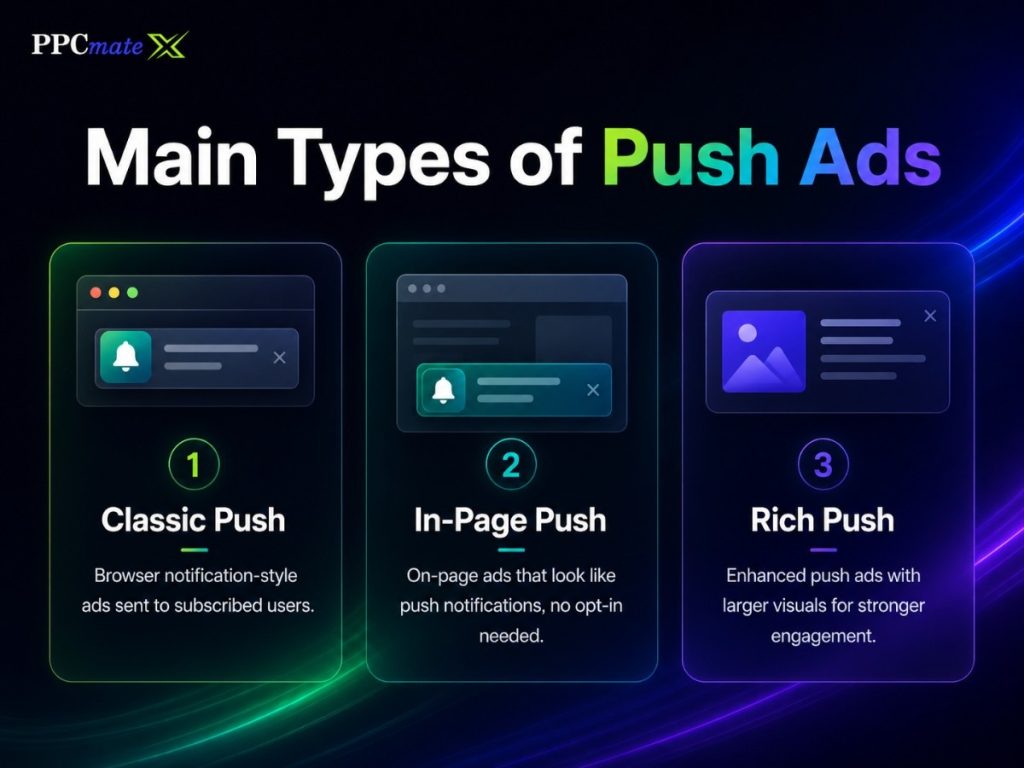
| Push Ad Type | How It Works | Best For |
| Web push ads | Sent through browser notifications | Offers, alerts, retargeting |
| Mobile push ads | Appear on mobile devices | Apps, e-commerce, lead generation |
| In-page push ads | Appear inside a website page | Wider reach and browser-friendly traffic |
| In-app push ads | Appear inside mobile apps | App engagement and reactivation |
Why Advertisers Use Push Ads
Push ads are popular because they are direct and performance-focused.
They help advertisers:
- Launch campaigns quickly
- Test offers with controlled budgets
- Reach mobile and desktop users
- Drive fast visits to landing pages
- Compare traffic sources
- Optimize based on live campaign data
Advertisers can also manage traffic buying costs by setting bids, daily budgets, and campaign limits.
Best Use Cases for Push Ads
Push ads can support many campaign goals.
E-commerce Campaigns
Push ads can promote flash sales, coupons, product deals, and cart recovery messages.
They work best when the offer is simple and urgent.
Affiliate Marketing
Affiliates use push ads to test CPA offers across geos, devices, and sources.
Common goals include signups, trials, installs, and lead forms.
App Install Campaigns
Push ads can send users directly to an app store or app landing page.
They are useful for utility apps, finance apps, games, and entertainment apps.
Lead Generation
Advertisers can use push ads to drive users to forms, quote pages, and sign-up pages.
The message should match the landing page closely.
Retargeting
Push ads can bring back users who clicked, visited, or showed interest before.
This works well when the user already knows the offer.
Push Ad Targeting Options
Targeting helps advertisers reach users who are more likely to act.
Common targeting options include:
- Country
- Region or city
- Device type
- Operating system
- Browser
- Language
- Connection type
- Carrier or ISP
- Website source
- App source
- Supply partner
- Time of day
- Whitelist or blacklist
- Retargeting audience
For scaling, access to quality traffic sources helps advertisers compare more placements and find stronger segments.
Push Ad Creative Strategy
Push ads have limited space. The message must be clear.
A good push ad should answer three questions:
- What is the offer?
- Why should the user care?
- What should the user do next?
Strong Push Ad Creative Includes
- A clear benefit
- A short headline
- Simple words
- A relevant icon
- A direct call to action
- A landing page that matches the ad
Push Ad Examples
| Campaign Goal | Title | Message |
| E-commerce | Deal Ends Soon | Save today on selected products |
| App install | Try This App | Simple tools in one quick download |
| Lead generation | Check Your Rate | Compare options in two minutes |
| Content | Trending Today | See what readers are opening now |
| Retargeting | Still Interested? | Come back and finish your signup |
How to Use a Push Ad Network
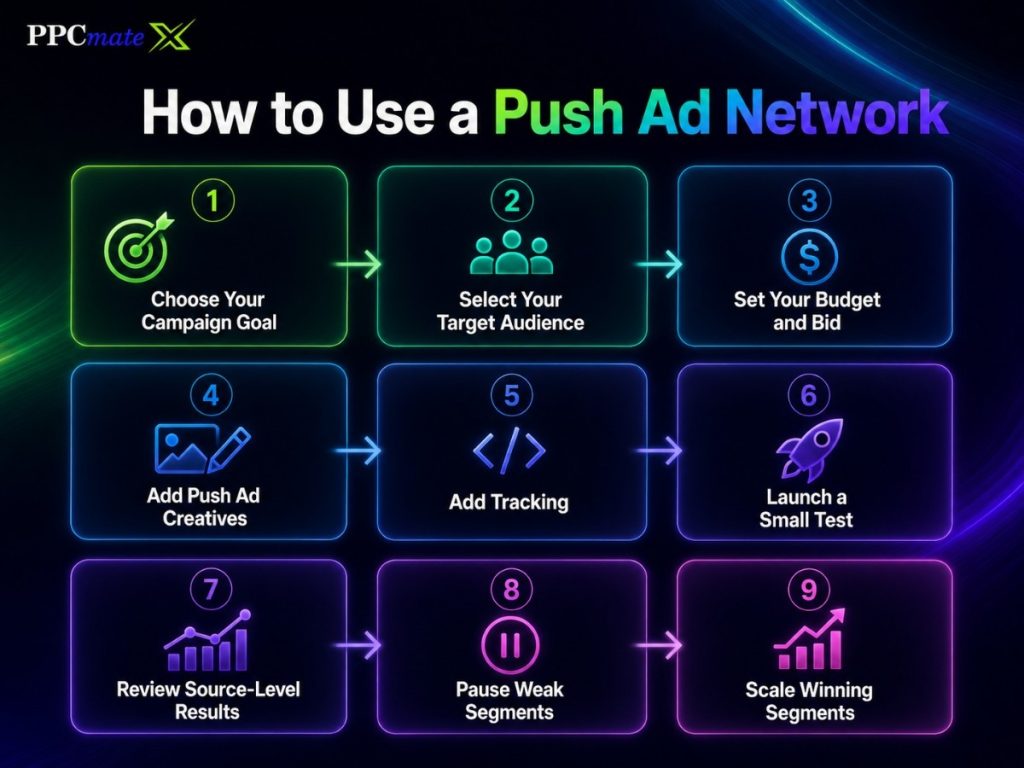
A push ad network helps advertisers buy notification-style traffic from many publishers and sources. The goal is to launch small, track results, and scale what works.
1. Choose Your Campaign Goal
Start with one clear goal.
This could be:
- Website visits
- App installs
- Leads
- Sales
- Retargeting
- Offer testing
A clear goal makes targeting, bidding, and optimization easier.
2. Select Your Target Audience
Choose the users you want to reach.
Start with basic targeting such as:
- Country
- Device
- Operating system
- Browser
- Language
- Connection type
Keep the first test simple. Too many filters can limit traffic too early.
3. Set Your Budget and Bid
Decide how much you want to spend each day.
Set a bid that matches your test goal. Many advertisers start with CPC because they pay when users click.
Use a small test budget first. Increase spend only when the data supports it.
4. Add Push Ad Creatives
Create a short title, message, and icon.
The message should be clear and direct. Tell users what they get after clicking.
Test 3 to 5 creatives at the start. This gives enough data without making results hard to compare.
5. Add Tracking
Tracking helps you see what happens after the click.
Track key actions such as:
- Visits
- Signups
- Purchases
- Installs
- Leads
- Revenue
Without tracking, it is hard to know which sources are profitable.
6. Launch a Small Test
Start with a controlled test.
Do not scale too fast. Let the campaign collect enough clicks and conversions before making major changes.
A clean push network setup helps advertisers test traffic without wasting budget on broad settings.
7. Review Source-Level Results
Check which sources, devices, geos, and operating systems perform best.
Look for patterns. One source may bring cheap clicks but no conversions. Another may cost more but produce better leads or sales.
8. Pause Weak Segments
Stop traffic that spends money without results.
Pause weak:
- Sources
- Devices
- Geos
- OS versions
- Creatives
- Time blocks
This helps protect the budget.
9. Scale Winning Segments
Increase spend on what works.
Raise bids slowly. Increase daily budget only after the campaign shows stable results.
Scaling should be based on conversions, not only clicks.
What to Track in Push Ad Campaigns
Push ads should be measured beyond clicks. Clicks show interest, but conversions show real campaign value.
| Metric | What It Shows | Why It Matters |
| Impressions | How many times the ad was shown | Helps measure reach |
| Clicks | How many users clicked the ad | Shows early interest |
| CTR | Click rate from impressions | Helps judge creative strength |
| CPC | Cost per click | Shows traffic cost |
| Spend | Total campaign cost | Helps control budget |
| Conversions | Completed goals | Shows campaign results |
| Conversion rate | Clicks that became actions | Helps judge traffic quality |
| CPA | Cost per action | Shows if the campaign is profitable |
| ROAS | Revenue compared to ad spend | Important for e-commerce and sales campaigns |
| Source performance | Results by traffic source | Helps find winners and losers |
| Device performance | Results by desktop, mobile, or tablet | Helps separate buying strategy |
| Geo performance | Results by country or region | Helps improve targeting |
| Time performance | Results by hour or day | Helps with dayparting |
| Bounce rate | Users who leave fast | Helps judge landing page fit |
Good tracking helps advertisers make better decisions. It shows what to pause, what to test, and what to scale.
How to Optimize Push Ads
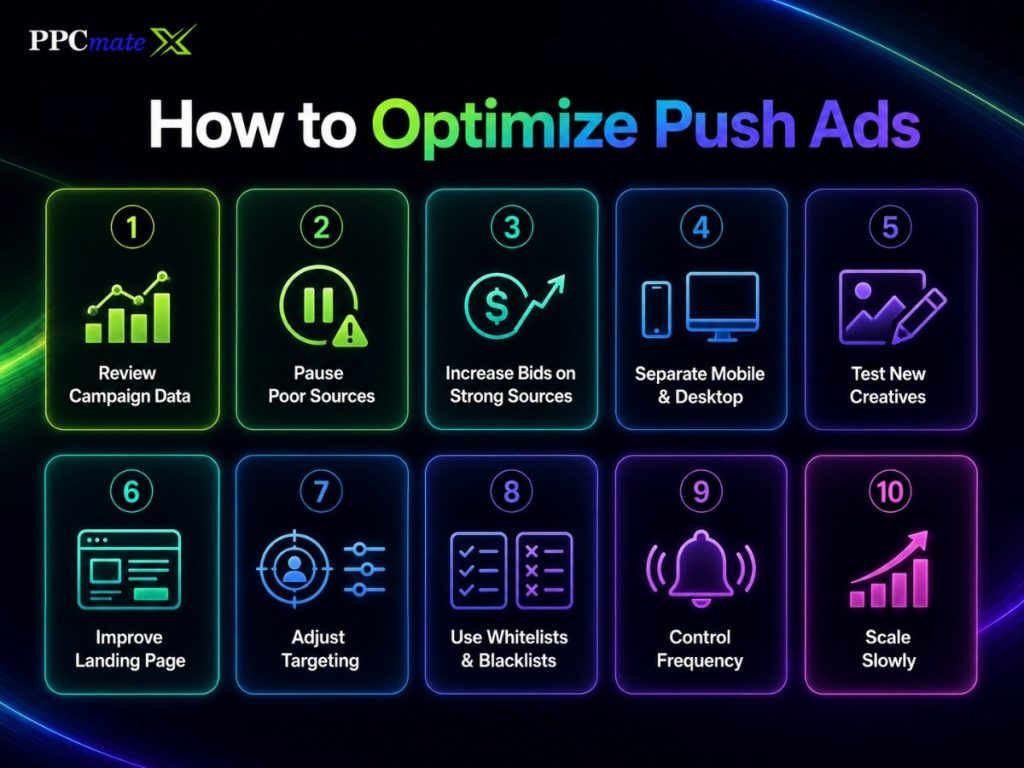
Optimization means improving campaign results after launch. Start with simple changes based on real data.
1. Review Campaign Data First
Do not change the campaign too early.
Look at clicks, spend, conversions, CPA, and source quality. Make sure there is enough data before judging performance.
2. Pause Sources With Poor Results
Find sources that spend money but do not convert.
Pause them first. This is one of the fastest ways to reduce wasted spend.
3. Increase Bids on Strong Sources
Some sources may bring better users.
If a source has strong CPA or ROAS, increase the bid slowly. This can help win more traffic from that source.
4. Separate Mobile and Desktop Traffic
Mobile and desktop users often behave differently.
Run separate campaigns when possible. This makes bids, creatives, and landing pages easier to control.
5. Test New Creatives
Push ads depend heavily on the title, message, and icon.
Test one main change at a time. For example, test a new headline before changing the landing page.
6. Improve the Landing Page
The landing page must match the ad.
If the push ad promises a discount, the landing page should show that discount clearly. A mismatch can hurt conversions.
7. Adjust Targeting
Use performance data to refine targeting.
Adjust by:
- Geo
- Device
- OS
- Browser
- Language
- Source
- Time of day
Do not narrow too much before you have enough data.
8. Use Whitelists and Blacklists
Add strong sources to a whitelist.
Add weak or low-quality sources to a blacklist.
This gives advertisers more control over traffic quality.
9. Control Frequency
Showing the same push ad too often can reduce performance.
Use frequency caps when available. This helps reduce notification fatigue and keeps engagement cleaner.
10. Scale Slowly
Increase budget in steps.
Do not double or triple spend too quickly. Sudden scaling can change traffic quality.
A strong optimization framework helps advertisers improve push campaigns without relying on guesswork.
Push Ads vs Popunder Ads
Push ads and popunder ads can both drive direct-response traffic. The best choice depends on the campaign goal.
| Factor | Push Ads | Popunder Ads |
| Format | Notification-style ad | Landing page opens behind or near browser session |
| Best for | Offers, alerts, retargeting | High-volume traffic testing |
| Creative need | Short title, message, icon | Strong landing page |
| User intent | Medium after click | Often lower but broader |
| Main test area | Creative and source quality | Landing page and source quality |
Use push ads when the message is short and action-focused. Use a popunder comparison when choosing between notification traffic and high-volume page visits.
Push Ads vs Native Ads
Push ads are direct. Native ads are more content-driven.
| Factor | Push Ads | Native Ads |
| Format | Notification-style | Content-style placement |
| Best for | Fast action | Education and discovery |
| Funnel stage | Direct response | Mid-funnel |
| Creative | Short and direct | Headline, image, teaser |
| Landing page | Offer page or short pre-lander | Article, advertorial, product page |
Push ads work well for quick offers. Native traffic campaigns work better when users need more context before converting.
Push Ads vs Display and Video Ads
Push ads are not the only format advertisers can use.
Display ads are useful for visual reach, retargeting, and brand visibility. Display ad campaigns can support push campaigns by keeping the brand visible across more placements.
Video ads are better when the offer needs motion, sound, or explanation. Video ad placements can help with product demos, app previews, and awareness campaigns.
Common Push Ad Mistakes
Avoid these mistakes:
- Targeting too broadly at launch
- Using vague headlines
- Sending all traffic to one landing page
- Ignoring source-level data
- Testing too many creatives at once
- Running without conversion tracking
- Judging results too early
- Not separating mobile and desktop traffic
Push ads need steady testing. Small changes can improve results over time.
How PPCmate Helps Advertisers Run Push Ads
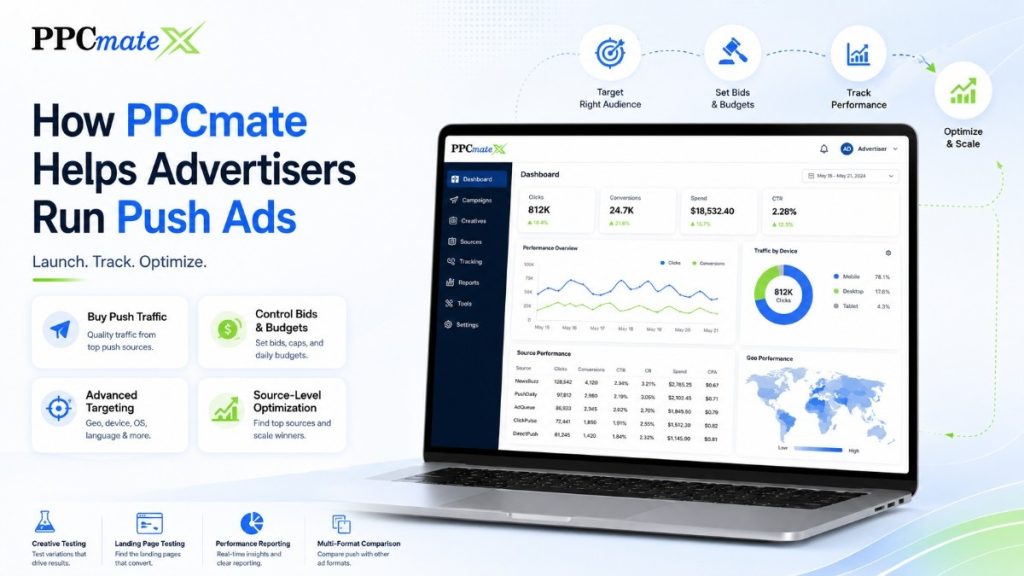
PPCmate helps advertisers launch, manage, and optimize push ad campaigns from one platform.
Advertisers can use PPCmate to:
- Buy push traffic
- Control bids and budgets
- Target by geo, device, OS, language, and source
- Test creatives and landing pages
- Review campaign performance
- Optimize based on source-level data
- Compare push with other ad formats
PPCmate also supports wider paid traffic strategy across formats, channels, and campaign goals.
Ready to Launch Push Ads With More Control?
PPCmate gives advertisers a flexible platform for buying targeted push traffic across devices, geos, and sources.
Whether you want hands-on self-serve control or managed campaign support, PPCmate helps you launch, track, and optimize push ad campaigns from one platform.
FAQs
1. Are push ads good for small advertisers?
Yes. Push ads can work for small advertisers if they start with clear goals, tight targeting, and controlled budgets.
2. What is the best pricing model for push ads?
Many push campaigns use CPC pricing. This helps advertisers pay for clicks instead of only impressions.
3. What should advertisers prepare before launching push ads?
Advertisers should prepare creatives, landing pages, tracking links, target geos, budget limits, and conversion goals.
4. How many creatives should advertisers test?
Start with 3 to 5 creatives. This gives enough variety without making the test hard to read.
5. Can push ads work for e-commerce?
Yes. Push ads can support deals, coupons, product launches, retargeting, and online sales campaigns.
6. Are push ads better than native ads?
Not always. Push ads are better for quick action. Native ads are better when the offer needs more explanation.
7. How do advertisers reduce wasted push ad spend?
They should track conversions, pause weak sources, adjust bids, test creatives, and use whitelists or blacklists.
8. Does PPCmate support push ads?
Yes. PPCmate supports push ad campaigns with targeting, budget control, reporting, and optimization tools.