Display ads help advertisers reach people while they browse websites, use apps, read content, or move across digital pages. To understand how do display ads work, think of them as visual messages that connect a clear offer with the right user at the right time.
They usually include an image, short text, a brand message, and a call to action. The goal is to make the offer easy to notice, understand, and act on.
For advertisers, media buyers, affiliates, e-commerce teams, and agencies, display ads can support awareness, traffic, retargeting, leads, and sales.
Key Takeaways
- Display ads are visual online ads shown across websites, apps, and publisher placements.
- Advertisers use display ads to reach users before, during, and after purchase intent.
- Display ads can be bought through ad networks, DSPs, direct publishers, or programmatic auctions.
- Targeting helps control who sees the ad based on location, device, behavior, context, source, and audience data.
- Strong performance depends on clear creatives, clean tracking, strong landing pages, and steady optimization.
What Are Display Ads?
Display ads are visual ads that appear on digital properties.
They can include:
- A banner or image
- A short headline
- Supporting text
- A brand logo
- A call to action
- A landing page link
Display ads are often used to create demand, bring users back, and keep a brand visible across the web.
Advertisers can run targeted display campaigns to reach users across different devices, geos, sources, and publisher placements.
How Do Display Ads Work?
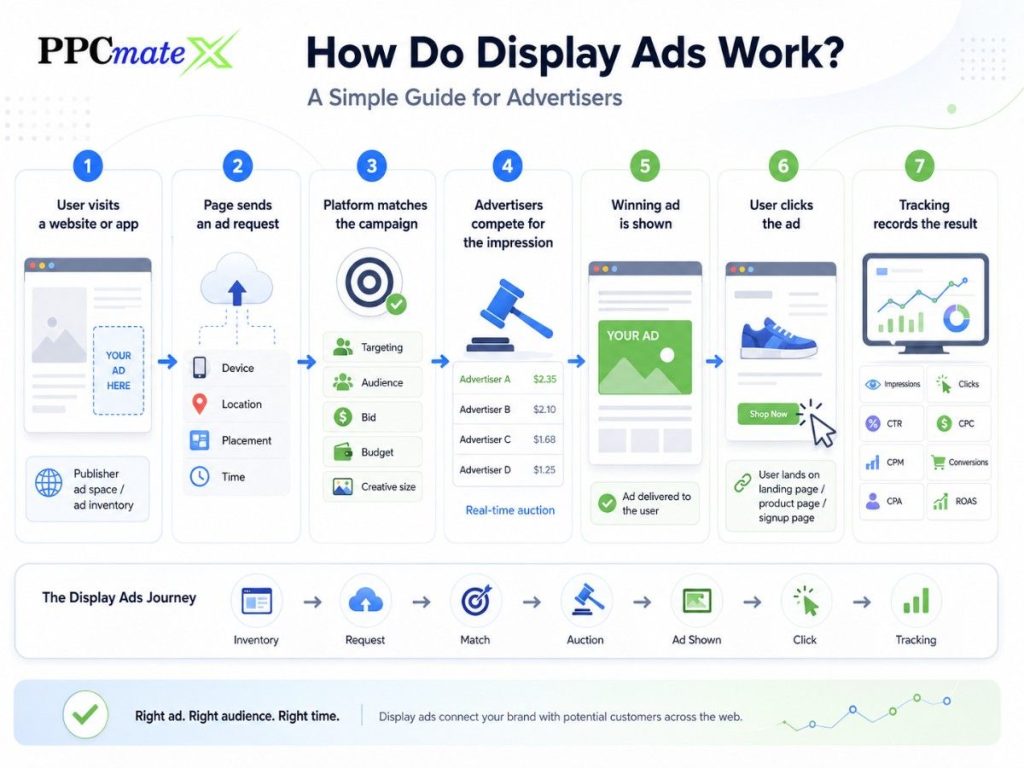
Display ads work by connecting advertisers with available ad space on websites, apps, and digital platforms.
The process starts when a user opens a page or app where ad space is available. That space sends a request to an ad platform. The platform checks which ads match the user, placement, targeting, bid, and campaign rules.
The winning ad is then shown to the user. If the user clicks, they land on the advertiser’s website, product page, app page, or lead form.
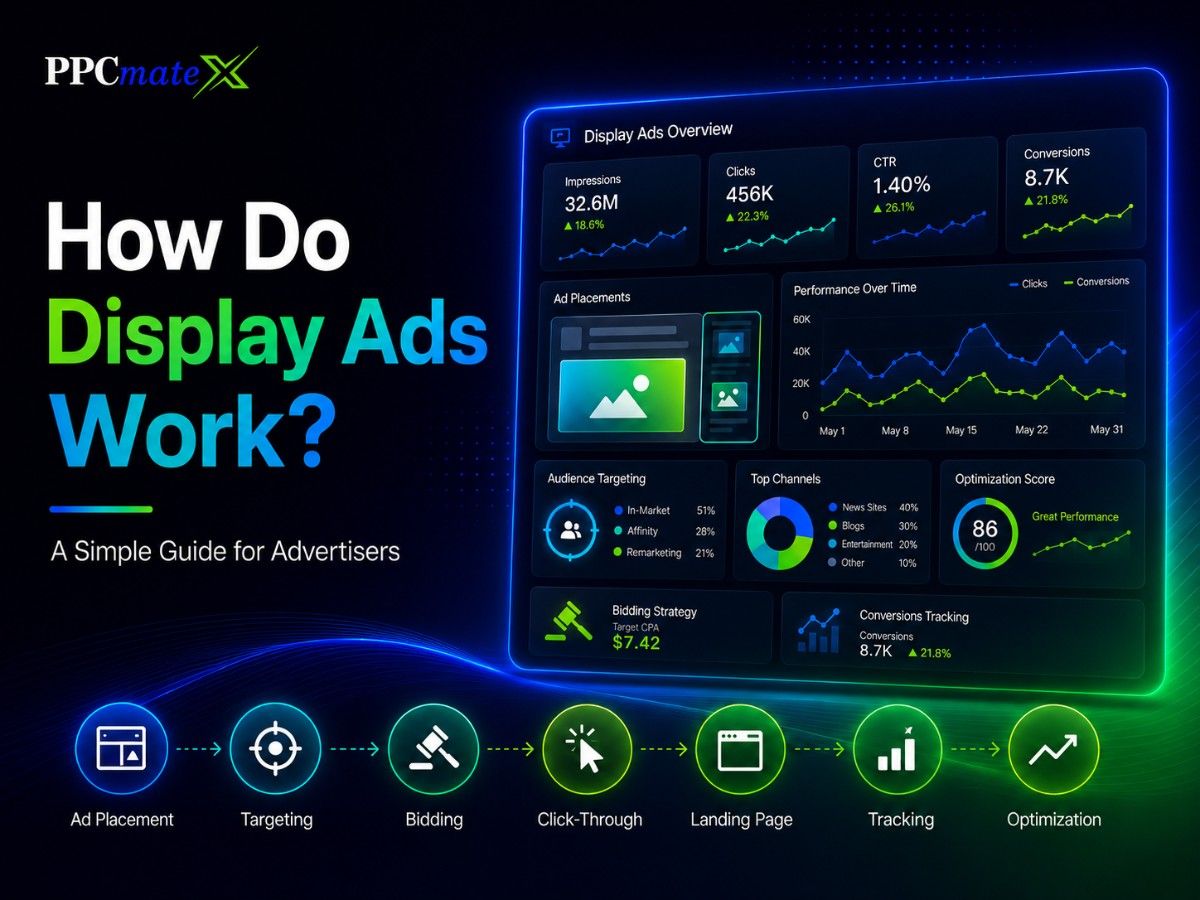
A clean display campaign flow helps advertisers understand where budget goes and which placements create results.
1. A User Visits a Website or App
The process begins when a user visits a page, opens an app, or views a digital placement.
The publisher has available ad space, such as:
- Header banner
- Sidebar ad
- In-content ad
- Mobile placement
- App placement
- Retargeting placement
This available space is called ad inventory.
2. The Page Sends an Ad Request
When the page loads, the ad placement sends an ad request.
The request may include basic signals such as:
- Page or app source
- Device type
- Browser
- Operating system
- Country or region
- Placement size
- Time of day
- Available ad format
These signals help the ad platform decide which campaigns are eligible to appear.
3. The Platform Matches the Campaign
The ad platform checks active advertiser campaigns.
It looks for campaigns that match the request based on:
- Target geo
- Device type
- Browser or OS
- Audience segment
- Context or category
- Bid amount
- Budget limit
- Creative size
- Frequency rules
If the campaign matches the placement and user signals, it can enter the auction or delivery process.
4. Advertisers Compete for the Impression
In programmatic display advertising, advertisers often bid in real time.
This means the system decides which advertiser is willing to pay the right amount for that impression.
The winning ad is usually based on:
- Bid price
- Targeting match
- Campaign budget
- Creative approval
- Placement rules
- Traffic quality settings
The goal is not always to win the cheapest impression. The goal is to win impressions that can support clicks, leads, sales, or retargeting actions.
5. The Ad Is Shown to the User
After the platform chooses the winning campaign, the display ad appears on the page or app.
A good display ad should be easy to understand quickly.
It should show:
- What the offer is
- Why it matters
- What the user should do next
This is why simple images, short headlines, and clear CTAs usually work better than crowded creatives.
6. The User Clicks the Ad
If the message interests the user, they click the ad.
The click sends the user to a landing page, such as:
- Product page
- Offer page
- Sign-up page
- App download page
- Quote form
- Checkout page
- Retargeting page
The landing page should match the ad message. If the ad promotes a discount, the page should show the discount clearly.
7. Tracking Records the Result
Tracking helps advertisers understand what happens after the ad is shown or clicked.
Advertisers should track:
- Impressions
- Clicks
- CTR
- CPC
- CPM
- Conversions
- CPA
- ROAS
- Source performance
- Device performance
- Geo performance
Without tracking, it is hard to know which placements are helping and which ones are wasting budget.
Simple Display Ad Flow
| Step | What Happens | Why It Matters |
| User visits a page | Ad space becomes available | Creates a chance to show an ad |
| Ad request is sent | Platform checks available campaigns | Matches ads to user and placement signals |
| Campaign is selected | Targeting, bid, and rules are reviewed | Controls delivery quality |
| Auction happens | Eligible advertisers compete | Decides which ad appears |
| Ad is shown | User sees the creative | Builds awareness or interest |
| User clicks | User visits the landing page | Creates traffic and action |
| Tracking records data | Results are measured | Helps optimize spend |
Main Parts of a Display Ad Campaign
| Campaign Part | What It Does |
| Goal | Defines the result, such as traffic, leads, sales, or retargeting |
| Audience | Controls who can see the ad |
| Creative | Shows the message, image, and CTA |
| Placement | Decides where the ad can appear |
| Bid | Sets how much the advertiser is willing to pay |
| Budget | Controls daily or total spend |
| Landing page | Converts the visitor after the click |
| Tracking | Shows which traffic is working |
Each part affects performance. A strong ad can get attention, but weak targeting or a poor landing page can still waste spend.
Where Do Display Ads Appear?
Display ads can appear in many online placements.
Common placements include:
- Website headers
- Sidebar areas
- In-article placements
- Mobile web pages
- Apps
- Publisher networks
- Programmatic exchanges
- Retargeting placements
Some display ads look like classic banners. Others use responsive sizes, native-style layouts, or rich media.
Advertisers comparing ad formats should understand how banner placements differ from wider display advertising, because display can include more formats and buying methods.
Common Types of Display Ads
| Display Ad Type | How It Works | Best For |
| Static banner | Uses one image and message | Simple offers and awareness |
| Responsive display | Adjusts to different placements | Wider reach |
| Rich media | Uses motion or interaction | Higher engagement |
| Retargeting display | Reaches previous visitors | Returning users |
| Native-style display | Blends with page content | Softer discovery |
| Programmatic display | Uses automated buying | Scaling and optimization |
Why Advertisers Use Display Ads
Display ads help advertisers reach users across different stages of the funnel.
They can support:
- Brand awareness
- Website traffic
- Product promotions
- Lead generation
- App installs
- Retargeting
- E-commerce sales
- Offer testing
Display ads are useful because they do not only wait for users to search. They help advertisers reach users while they browse, compare, read, or return to a previous interest.
For paid media planning, the difference between search and display matters because search captures demand, while display helps create and recover demand.
Display Ad Creative Strategy
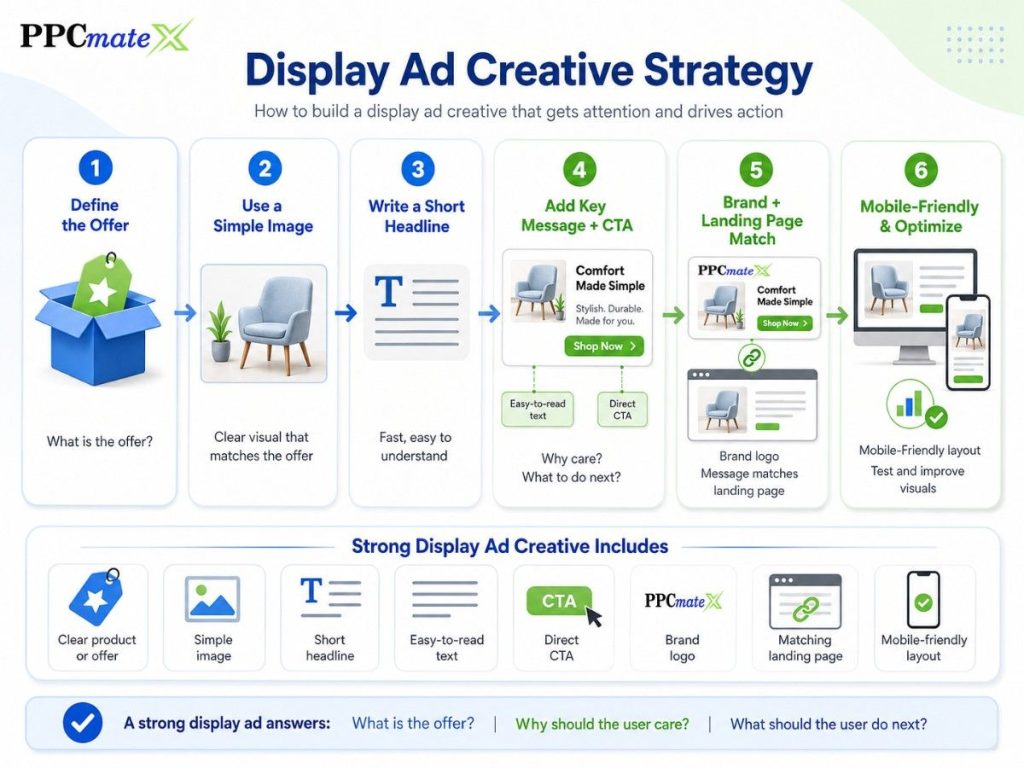
Display ads have limited time to get attention. The message should be clear in a few seconds.
A strong display ad should answer:
- What is the offer?
- Why should the user care?
- What should the user do next?
Strong Display Ad Creative Includes
- Clear product or offer
- Simple image
- Short headline
- Easy-to-read text
- Direct CTA
- Brand logo
- Matching landing page
- Mobile-friendly layout
Better creative often starts with better visuals. Advertisers can improve attention by using strong PPC images that match the offer and audience.
Display Ad Examples
| Campaign Goal | Example Headline | Example Message |
| E-commerce | Save Today | Limited-time deals on selected products |
| Lead generation | Get a Quote | Compare options in minutes |
| App install | Try the App | Simple tools for daily use |
| Retargeting | Still Interested? | Come back and finish your order |
| Brand awareness | Meet the Brand | A faster way to solve your problem |
The ad message and landing page should match. A mismatch can lower trust and reduce conversions.
How Advertisers Buy Display Ads
Advertisers can buy display ads in several ways.
| Buying Method | How It Works |
| Direct publisher deal | Advertiser buys placement from a website or publisher |
| Ad network | Network groups inventory from many sites and apps |
| DSP | Advertiser buys traffic through one platform |
| Programmatic auction | Advertisers bid for impressions in real time |
| Retargeting platform | Ads reach users who already visited or engaged |
Many advertisers use a DSP because it gives more control over targeting, bidding, budgets, reporting, and optimization.
A broader programmatic buying setup can help advertisers manage display campaigns across formats, traffic sources, and pricing models.
What to Track in Display Ad Campaigns
Do not judge display ads by clicks alone. Display can support awareness, retargeting, and assisted conversions.
Track these metrics:
| Metric | What It Shows |
| Impressions | How many times the ad was shown |
| Clicks | How many users clicked |
| CTR | How often impressions became clicks |
| CPC | Average cost per click |
| CPM | Cost per 1,000 impressions |
| Conversions | Leads, sales, installs, or signups |
| CPA | Cost per conversion |
| ROAS | Revenue compared to ad spend |
| Viewability | Whether the ad had a chance to be seen |
| Frequency | How often the same user sees the ad |
| Source performance | Which placements produce results |
Clear reporting helps advertisers decide what to pause, test, or scale. Strong online ad metrics make optimization more practical.
How to Optimize Display Ads
Optimization means improving campaign results after launch.
With programmatic expected to account for 96% of new display ad dollars in 2026, steady optimization helps advertisers protect budget and scale what works.
Start with simple actions:
- Pause sources that spend without results.
- Increase bids on sources with strong CPA or ROAS.
- Test one creative change at a time.
- Separate mobile and desktop when results differ.
- Review performance by geo, OS, browser, and source.
- Use frequency caps to reduce ad fatigue.
- Improve landing pages when clicks do not convert.
- Build whitelists and blacklists from source-level data.
Display ads work best when advertisers make steady decisions from real data.
Advertisers can also protect user experience by creating less disruptive ads that balance visibility, timing, and relevance.
Display Ads vs Native Ads
Display ads are more visual and direct. Native ads are more content-led and often need more context.
| Factor | Display Ads | Native Ads |
| Format | Visual ad placement | Content-style placement |
| Best for | Awareness, retargeting, traffic | Education and discovery |
| Creative | Image, banner, CTA | Headline, image, teaser |
| Funnel stage | Upper to lower funnel | Mostly upper to mid funnel |
| Main strength | Fast visibility | Softer user experience |
When offers need more explanation, native and display can help advertisers choose the better format for the funnel stage.
Common Display Ad Mistakes
Avoid these mistakes:
- Using vague headlines
- Adding too much text to the creative
- Sending all traffic to one landing page
- Ignoring source-level data
- Testing too many creatives at once
- Running without conversion tracking
- Targeting too broadly for too long
- Ignoring mobile performance
- Showing the same ad too often
- Scaling before results are stable
Small changes can improve display campaign performance over time. The key is to test carefully and optimize from clean data.
How PPCmate Helps Advertisers Run Display Ads
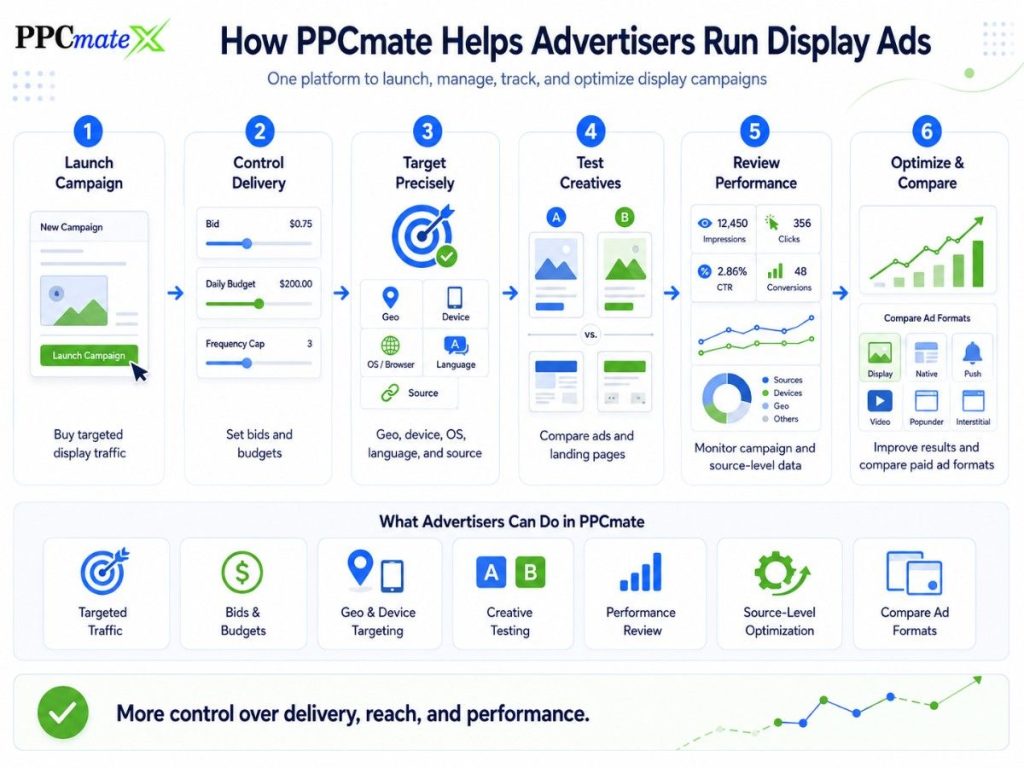
PPCmate helps advertisers launch, manage, and optimize display ad campaigns from one platform. For advertisers learning how to display ads work, PPCmate makes the process easier by giving them more control over targeting, delivery, tracking, and performance.
Advertisers can use PPCmate to:
- Buy targeted display traffic
- Control bids and budgets
- Target by geo, device, OS, language, and source
- Test creatives and landing pages
- Review campaign performance
- Optimize based on source-level data
- Compare display with other paid ad formats
PPCmate also supports wider paid traffic strategies for advertisers who want more control over delivery, reach, and performance.
Ready to Launch Programmatic Ads With More Control?
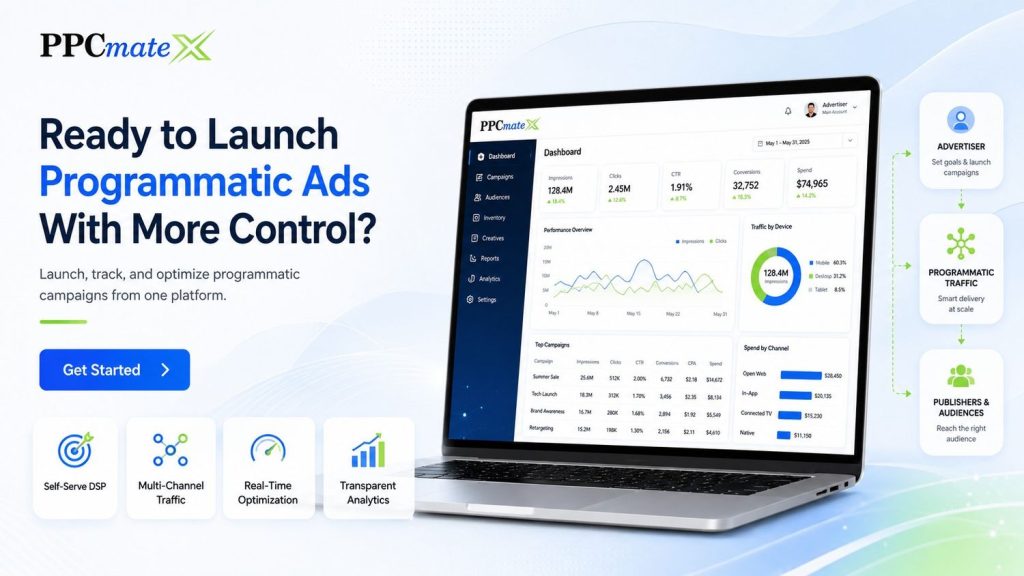
PPCmate gives advertisers a flexible DSP for buying targeted traffic across multiple channels, formats, and pricing models.
Whether you want hands-on self-serve control or managed campaign support, PPCmate helps you launch, track, and optimize programmatic campaigns from one platform.
FAQs
Are display ads good for small advertisers?
Yes. Display ads can work for small advertisers when they start with clear goals, tight targeting, controlled budgets, and clean tracking.
What is the main purpose of display ads?
The main purpose is to reach users visually across websites, apps, and digital placements. Display ads can support awareness, traffic, retargeting, leads, and sales.
How are display ads priced?
Display ads are often priced by CPM, CPC, or CPA, depending on the platform, campaign goal, and buying method.
What should advertisers prepare before launching display ads?
Advertisers should prepare creatives, landing pages, tracking links, target geos, budget limits, bids, and conversion goals.
How do advertisers reduce wasted display ad spend?
They should track conversions, pause weak sources, adjust bids, test creatives, control frequency, and review source-level results.
Are display ads better than search ads?
Not always. Display ads are better for reach, awareness, and retargeting. Search ads are better when users are already searching for a specific product or service.
Does PPCmate support display ads?
Yes. PPCmate supports display ad campaigns with targeting, budget control, reporting, and optimization tools.