This release is about seeing more and getting more. A new Special Offers page brings rewards, partner deals and 113 tools together, Reports now count the people you reach and how much of your video they watch, and a Channels report shows where your budget works. Here’s everything new.
1. Special Offers
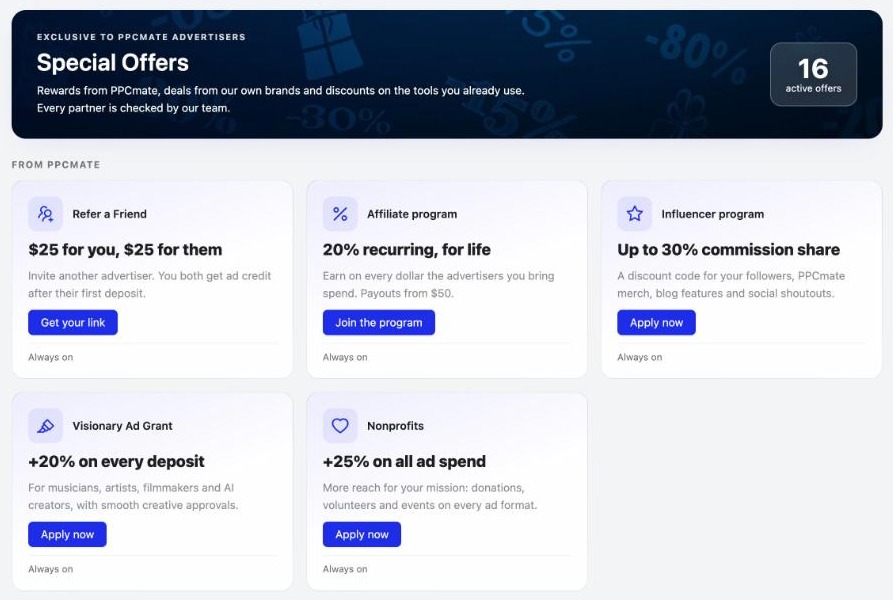
Open Finance › Special Offers, or the new icon in the header, to see everything you can get from PPCmate in one place: Refer a Friend, the affiliate and influencer programs, the Visionary Ad Grant for creators and the nonprofit bonus. Below them are deals from our own brands and discounts from partners we’ve checked, including RedTrack, Semrush, SpyFu, MailerLite and BeMob, plus a Tool Directory of 113 marketing tools.
2. Reach, frequency and video watched
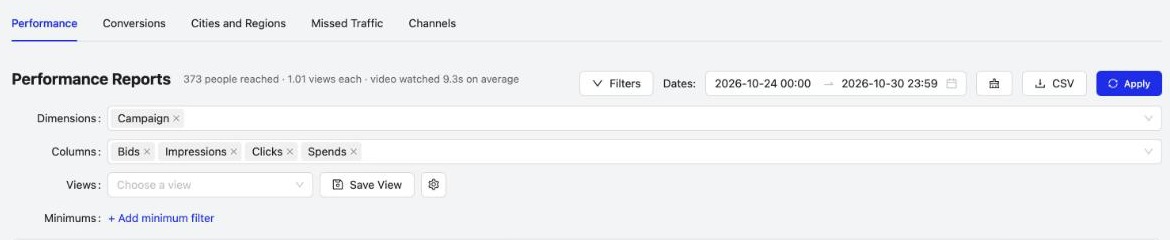
Reports now tell you how many people your ads reached, how many times each saw them (Avg frequency) and, for video, how many seconds they watched on average. You’ll see it on the Performance tab, per channel, and as Reach and Video watched cards you can add to your dashboard.
3. A Channels report
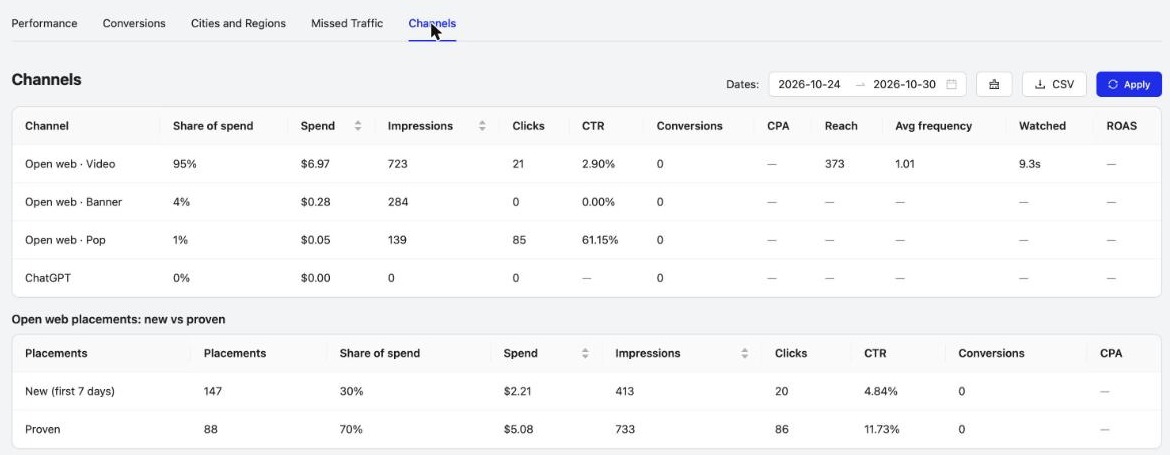
The new Channels tab in Reports splits spend, impressions, clicks, conversions, reach and frequency by channel, and compares new placements (their first 7 days) with proven ones, so you can see where your budget works.
4. Smarter dashboard cards
Value cards now compare with the previous period, and you can add Budget pacing, Balance runway and Missed traffic cards from the gear. The details sit in a tooltip, so the cards stay clean.

5. A redesigned New Audience
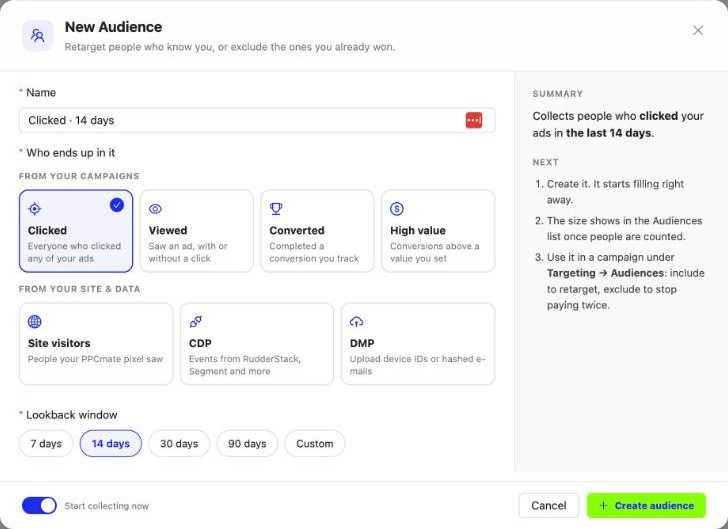
Pick who ends up in an audience from picture cards: Clicked, Viewed, Converted, High value, or from your own site and data, Site visitors, CDP and DMP. Choose a lookback window, and the name and a live summary fill in for you. Upload your list now offers a file, a URL sync or your own job, with a sample CSV, and New Rule, Add source bids and New source list share the same look.
6. Rejection reasons in plain words
When Google, ChatGPT or TikTok rejects an ad, the campaign status now shows the platform’s own reason instead of a bare “Rejected”, so you know exactly what to change.
Also new
- Bid too low for Microsoft Search and ChatGPT: Microsoft Search uses Microsoft’s own estimate and ChatGPT checks per country; a new campaign with no bids because of price hears it after 3 hours instead of 24.
- Checker buttons say what they do: Raise CPM bid to $X, Raise daily budget to $X, Edit frequency cap, Resume campaign.
- Video ads fit every placement: each upload also gets 16:9, 9:16 and 1:1 versions with a blurred background, no black bars.
- Goal and Missed traffic columns in the Campaigns list.
- Click to copy: ID badges and codes turn green and say Copied.
Frequently asked questions
What's new in PPCmate in the 30 October 2026 release?
A Special Offers page with PPCmate rewards, partner deals and a Tool Directory; reach, frequency and video watched in Reports and on the dashboard; a Channels report with new vs proven placements; Budget pacing, Balance runway and Missed traffic dashboard cards; the platform's own rejection reason for Google, ChatGPT and TikTok ads; Bid too low for Microsoft Search and ChatGPT; clearer Checker buttons; a redesigned New Audience; video ads in every shape; Goal and Missed traffic columns; and click to copy.
Where do I find Special Offers on PPCmate?
Under Finance in the left menu, or from the new icon in the header. It lists PPCmate rewards such as Refer a Friend and the affiliate program, deals from PPCmate's own brands, checked partner discounts and a Tool Directory of 113 marketing tools.
What do Reach and Avg frequency mean in PPCmate reports?
Reach is the number of different people who saw your ads. Avg frequency is how many times each of them saw an ad on average. For video ads, Watched shows the average seconds of video viewed.
What does the Channels report show?
It splits your spend, impressions, clicks, conversions, reach and frequency by channel, such as open-web video, banner, pop and ChatGPT, and compares placements in their first 7 days with proven ones.
Why was my Google, ChatGPT or TikTok ad rejected?
Open the campaign: its status now shows the reason the platform gave for rejecting the ad, so you can fix that ad and resubmit it.
Do I need to upload my video in several sizes?
No. Every video you upload also gets 16:9, 9:16 and 1:1 versions with a blurred background, so it can run in more placements without black bars.
How do I get PPCmate product updates first?
Join the PPCmate Telegram channel at t.me/ppcmate. Every release is posted there as soon as it ships, and all changes are listed in the release notes at ppcmate.com/releases.
Get updates first
Every PPCmate release goes to our Telegram channel the moment it ships. Join PPCmate on Telegram →
See every change in the release notes, or start a campaign and try it today.