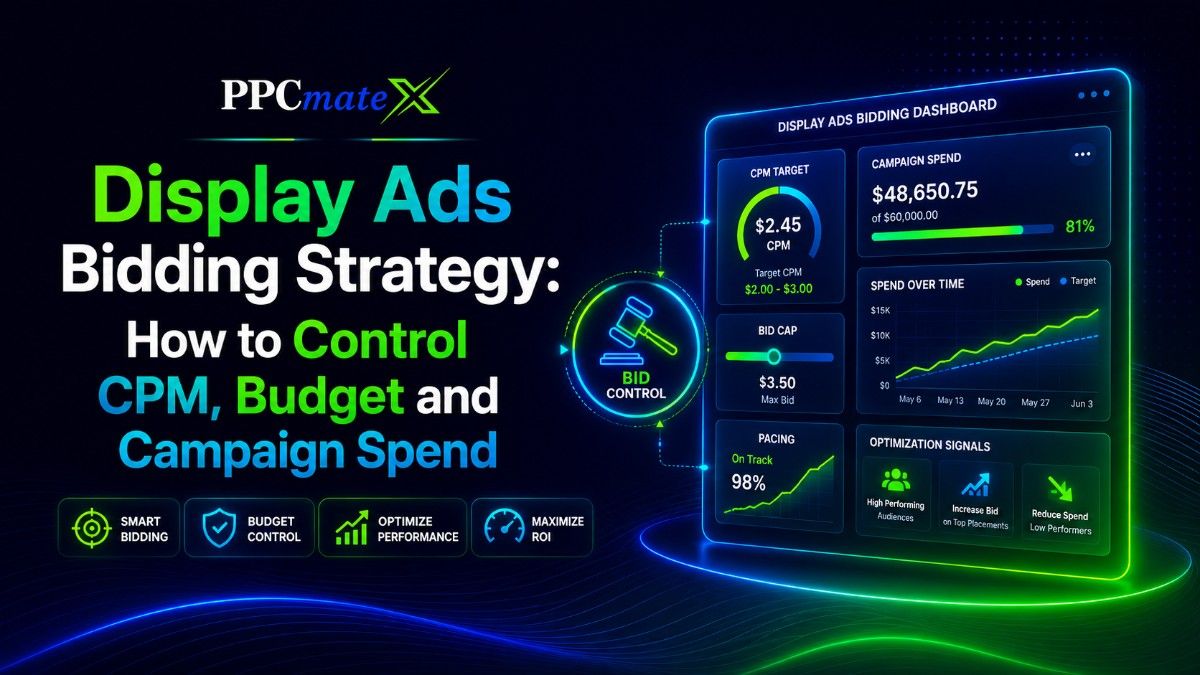
Display campaigns can lose money quickly when bids, budgets, and traffic sources are not managed properly. A low CPM may look attractive, but it does not help if the traffic does not convert.
A display ads bidding strategy helps advertisers protect their budget while testing traffic at scale. It connects CPM, bid caps, pacing, targeting, and conversion data so every spend decision has a clear reason.
What Is a Display Ads Bidding Strategy?
A display ads bidding strategy is the plan advertisers use to control how much they pay for display traffic. It sets the rules for bids, budgets, pacing, and optimization.
In simple terms, it answers three questions:
- How much are you willing to pay?
- Which impressions are worth buying?
- When should the campaign spend more or less?
For advertisers running display ad campaigns, bidding is not only about getting cheap impressions. The real goal is to buy useful impressions that can support the campaign goal.
How Display Ad Bidding Works
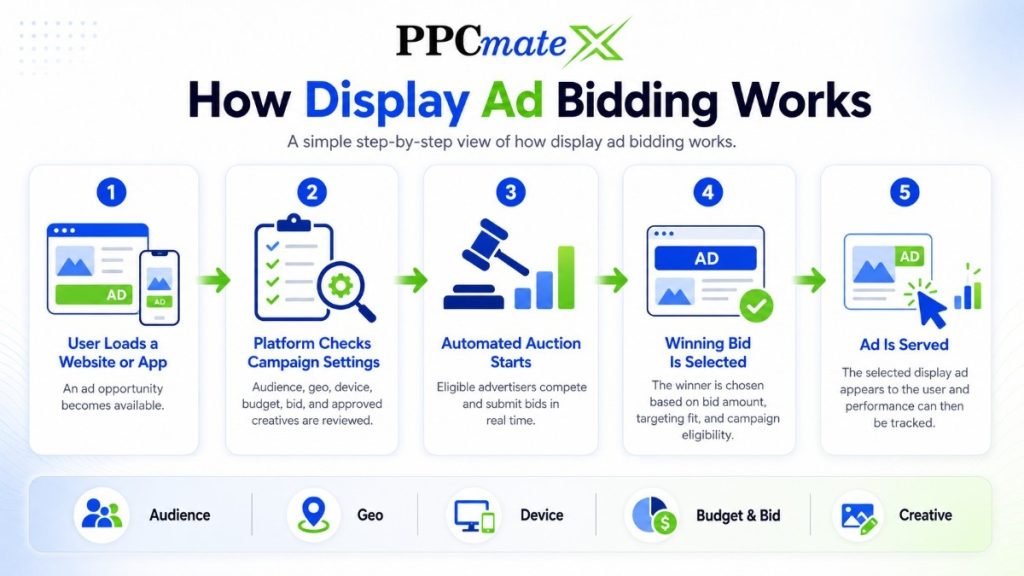
Display ads are usually bought through ad platforms, ad networks, or DSPs. When a user loads a website or app page, an ad opportunity becomes available.
At that moment, an automated auction takes place. Advertisers compete for the chance to show their ad to that specific user.
EMARKETER reported that worldwide programmatic display ad spending was expected to grow 14.6% in 2025, showing how important automated buying has become in display advertising.
The winning bid is selected based on factors such as bid amount, targeting settings, and campaign eligibility.
What Happens During the Bidding Process?
Before placing a bid, the platform reviews the campaign settings to determine whether the impression matches the advertiser’s requirements.
Common settings include:
- Audience targeting
- Interests
- Behavioral segments
- Retargeting audiences
- Geographic targeting
- Country
- Region
- City
- Device targeting
- Mobile
- Desktop
- Tablet
- Technical targeting
- Browser
- Operating system
- Connection type
- Campaign controls
- Budget limits
- Bid amount
- Frequency caps
- Scheduling rules
- Creative requirements
- Banner size
- Ad format
- Approved creatives
If the impression matches the campaign criteria, the platform can enter the auction and submit a bid.
Why Bidding Settings Matter
The quality of your bidding strategy directly affects campaign performance. Broad settings may generate more impressions, but they can also increase wasted spend. More refined targeting helps focus the budget on users who are more likely to engage or convert.
Key benefits of proper bidding controls include:
- Better CPM management
- More efficient budget allocation
- Higher-quality traffic
- Reduced wasted impressions
- Improved conversion potential
- Easier campaign optimization
A clear understanding of display ad delivery helps advertisers avoid guessing. The more control you have over the bid and targeting, the easier it is to manage spend and improve overall campaign efficiency.
Main Bidding Models for Display Ads
Different bidding models fit different campaign goals. The best choice depends on whether you want reach, visits, conversions, or revenue.
| Bidding Model | What You Pay For | Best For |
| CPM | 1,000 impressions | Reach, awareness, retargeting, traffic testing |
| CPC | Clicks | Website visits and landing page testing |
| CPA | Conversions or actions | Lead generation, signups, sales |
| Target ROAS | Revenue return | E-commerce and sales campaigns |
CPM is common in display advertising because it gives advertisers control over impression cost. CPC and CPA can be useful when the goal is closer to user action.
For a wider setup view, a complete display ads guide can help connect bidding with formats, targeting, and optimization.
How CPM Affects Campaign Spend
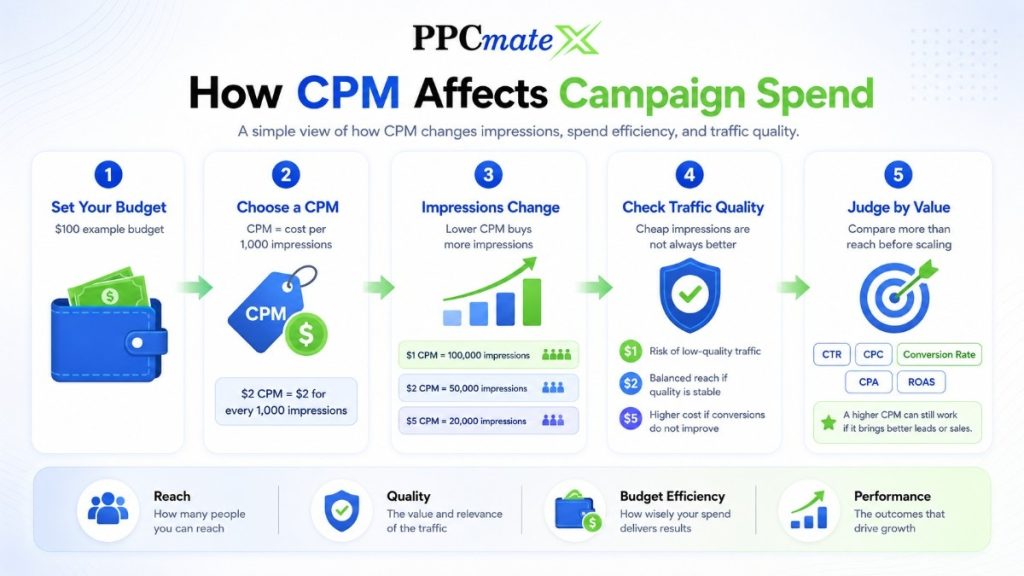
CPM means cost per thousand impressions. If your CPM is $2, you pay $2 for every 1,000 ad impressions.
A lower CPM can help you buy more impressions. But cheap impressions are not always better if they come from weak placements or users who do not convert.
A strong CPM strategy looks at both cost and quality. Advertisers should compare CPM with CTR, CPC, conversion rate, CPA, and ROAS before scaling.
CPM Example
| CPM | Impressions Bought With $100 | Main Risk |
| $1 | 100,000 | Low-quality traffic if targeting is too broad |
| $2 | 50,000 | Balanced reach if traffic quality is stable |
| $5 | 20,000 | Higher cost if conversions do not improve |
CPM should be judged by campaign value, not only by reach. A higher CPM can still work if the traffic produces better leads or sales.
Advertisers comparing market costs can use updated CPM ranges to understand how rates may change by geo, format, and traffic type.
Set the Campaign Goal Before the Bid
A bidding strategy should start with one clear goal. Without a goal, it is hard to know whether the CPM is too high or too low.
For example, an awareness campaign may accept a lower CTR if the CPM is efficient. A lead campaign needs stronger post-click performance, even if the CPM is higher.
Common display campaign goals include:
- Brand reach
- Website traffic
- Product sales
- Lead generation
- App promotion
- Retargeting
- Offer testing
The goal should guide the bid, budget, landing page, and optimization rule.
How to Control Display Ad Budget
Budget control means deciding how much the campaign can spend over a day, week, or full campaign flight. It protects the advertiser from spending too fast before enough data is available.
Start with a test budget that can collect useful data. The budget should be large enough to measure clicks and conversions, but small enough to limit risk. This approach helps advertisers identify profitable traffic sources before committing larger budgets.
A simple budget management process looks like this:
- Launch with a controlled test budget.
- Monitor impressions, clicks, and conversions.
- Identify high-performing traffic segments.
- Reduce spend on weak sources.
- Gradually increase budget on profitable segments.
Useful budget controls include:
- Daily budget
- Total campaign budget
- Bid cap
- Source-level limits
- Geo-level limits
- Device-level limits
- Time-of-day control
These controls can be grouped into three main categories:
| Budget Control Type | Purpose |
| Spend limits | Control total and daily campaign costs |
| Bid controls | Prevent overpaying in auctions |
| Traffic controls | Allocate budget by source, geo, device, or schedule |
For example, an advertiser running a $100 daily budget might discover that mobile traffic generates most clicks but desktop traffic produces more conversions. Instead of increasing the entire campaign budget, they can shift more spend toward desktop placements while reducing bids on lower-performing mobile traffic.
Another common example is geo-based budgeting. If one country delivers conversions at half the CPA of another, advertisers can increase budget allocation to that region while limiting spend elsewhere.
A DSP-focused setup in programmatic ad buying gives advertisers more room to adjust spend by traffic segment instead of treating all impressions the same. This level of control helps reduce wasted spend and ensures more of the budget reaches audiences that are most likely to deliver results.
Use Pacing to Avoid Overspending
Pacing controls how fast the campaign spends. Without pacing, a campaign may spend too much early in the day and miss better traffic later.
Even pacing spreads budget across the campaign period. Accelerated pacing spends faster when the platform finds available traffic.
Use even pacing when you want stable delivery. Use faster pacing only when the campaign has proven results or a short promotion window.
Budget Pacing Example
| Campaign Situation | Better Pacing Choice | Why |
| New test campaign | Even pacing | Gives time to collect data |
| Flash sale | Faster pacing | Captures short-term demand |
| Retargeting | Controlled pacing | Avoids over-showing ads |
| Scaling campaign | Gradual pacing | Reduces traffic quality swings |
Good pacing helps advertisers avoid two common problems: spending too fast and underdelivering late.
Set Bid Caps to Control CPM
A bid cap is the highest amount you are willing to pay for an impression group or auction. It helps control CPM and keeps the campaign from overpaying.
A bid cap that is too low may limit delivery. A bid cap that is too high may increase spend without improving results.
The best bid cap is based on performance data. Start with a controlled bid, review source-level results, then increase only where the traffic shows value.
Bid caps can be adjusted by:
- Country
- Device
- Browser
- Placement
- Source
- Time of day
- Retargeting audience
This gives advertisers more control than using one bid across the whole campaign.
Track eCPM, CPC, CPA, and ROAS Together
CPM shows impression cost, but it does not show full campaign quality. Advertisers need to connect CPM with post-click results.
Effective CPM, or eCPM, helps compare spend across different pricing models. CPC shows click cost. CPA shows action cost. ROAS shows revenue compared to ad spend.
Track these metrics together:
| Metric | What It Shows | Why It Matters |
| CPM | Cost per 1,000 impressions | Controls reach cost |
| CTR | Click rate | Shows creative appeal |
| CPC | Cost per click | Shows traffic cost after clicks |
| CPA | Cost per action | Shows conversion efficiency |
| ROAS | Revenue return | Shows sales performance |
| eCPM | Effective impression cost | Helps compare pricing models |
A campaign with a low CPM but weak CPA may need better targeting or landing page changes. A campaign with a higher CPM and strong ROAS may be worth scaling.
Optimize Spend by Source and Placement
Display traffic quality can change by source. One placement may bring cheap impressions but no conversions. Another may cost more but produce better buyers.
Source-level optimization helps advertisers move budget toward stronger traffic. This is one of the most important parts of campaign spend control.
Review source data for:
- Spend
- Impressions
- Clicks
- CTR
- Conversions
- CPA
- Revenue
- Bounce rate
- Time on site
Pause sources that spend without results. Increase bids on sources that produce stable conversions.
Control Frequency to Reduce Waste
Frequency shows how often the same user sees your ad. Too much frequency can waste impressions and reduce engagement.
A frequency cap limits how many times a user sees an ad within a set period. This helps protect budget and reduce ad fatigue.
Frequency caps are useful for:
- Retargeting campaigns
- Awareness campaigns
- Small audiences
- High-CPM traffic
- Long campaign flights
Display campaigns perform better when users see relevant ads at a controlled pace. Guidance on less disruptive ads supports better user experience and cleaner engagement.
Separate Mobile and Desktop Bids
Mobile and desktop traffic often behave differently. Users may click more on mobile, but convert better on desktop depending on the offer.
Separate campaigns or bid rules make performance easier to read. This helps advertisers avoid overpaying for one device type because another device looks strong.
Review device-level results before scaling. If mobile has low CPM but poor conversions, reduce the bid or improve the landing page. If desktop has fewer clicks but better sales, it may deserve a higher bid.
Improve Creative Before Raising Budget
Budget problems are not always bid problems. Sometimes the creative is weak, unclear, or mismatched with the landing page.
A strong display ad should explain the offer quickly. It should use a clear image, simple message, and direct call to action.
Creative testing should focus on one main change at a time:
- Image
- Headline
- Offer
- Call to action
- Ad size
- Landing page message
Better strong banner creative can improve CTR and lower effective click cost without forcing higher bids.
Know When to Increase or Lower Bids
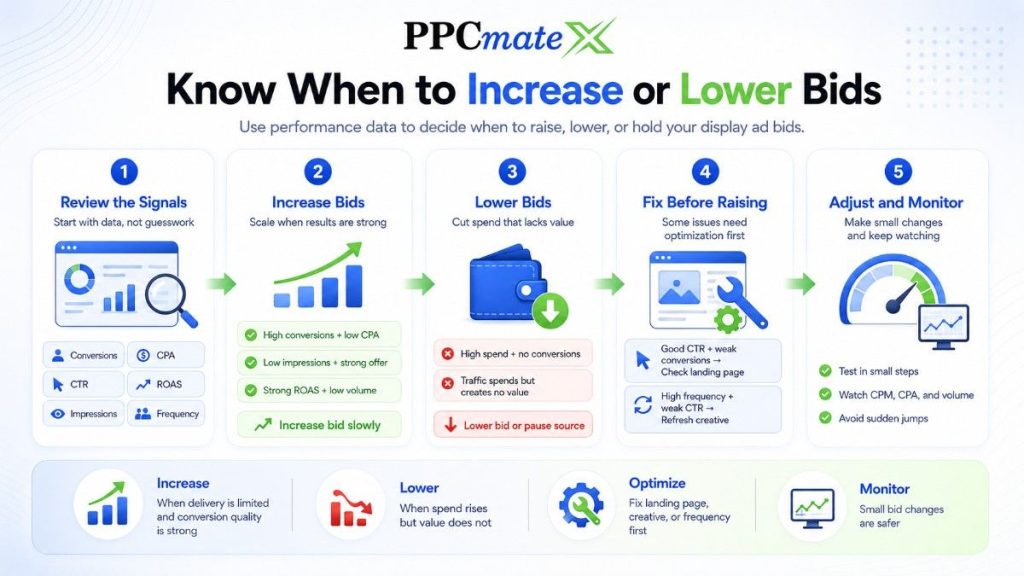
Bid changes should be based on data, not guesswork. Increasing bids can bring more impressions, but it can also raise CPM.
Raise bids when a segment has strong conversion data and limited delivery. Lower bids when traffic spends but does not create value.
Simple Bid Decision Table
| Campaign Signal | Action |
| High conversions and low CPA | Increase bid slowly |
| High spend and no conversions | Lower bid or pause source |
| Good CTR but weak conversions | Check landing page |
| Low impressions and strong offer | Test higher bid |
| High frequency and weak CTR | Reduce frequency or refresh creative |
| Strong ROAS but low volume | Increase budget in steps |
Small bid changes are safer than large jumps. Sudden increases can change the traffic mix and make results harder to read.
Common Display Ads Bidding Mistakes
Many display campaigns waste money because the bid strategy is too broad. Advertisers often start with one bid, one budget, and one landing page for every traffic segment.
This makes optimization harder. A better approach is to test in a controlled way, then adjust by source, geo, device, and performance.
Avoid these mistakes:
- Choosing CPM only because it looks cheap
- Raising budget before conversion data is clear
- Ignoring source-level spend
- Using the same bid for all devices
- Running without frequency caps
- Judging campaigns only by CTR
- Scaling before CPA or ROAS is stable
- Sending all traffic to one landing page
The best bidding strategy protects the budget while giving strong segments room to grow.
How PPCmate Helps Advertisers Control Display Campaign Spend
PPCmate helps advertisers buy and manage display traffic with more control over targeting, bidding, budgets, and optimization.
Advertisers can use PPCmate to test display campaigns across geos, devices, sources, and ad formats. They can also review performance data and adjust spend based on real campaign results.
PPCmate supports advertisers who need:
- Flexible campaign setup
- CPM-based buying control
- Geo and device targeting
- Source-level optimization
- Budget and bid management
- Display, native, push, video, and other traffic formats
- Self-serve control or managed support
This gives media buyers, affiliates, e-commerce teams, and agencies a practical way to test traffic, manage spend, and scale what works.
Ready to Launch Programmatic Ads With More Control?
PPCmate gives advertisers a flexible DSP for buying targeted traffic across multiple channels, formats, and pricing models. Whether you want hands-on self-serve control or managed campaign support, PPCmate helps you launch, track, and optimize programmatic campaigns from one platform.
FAQs
What is the best display ads bidding strategy?
The best strategy depends on the campaign goal. CPM works well for reach and traffic testing, while CPA or ROAS-focused bidding fits conversion and sales campaigns.
How do I control CPM in display ads?
Control CPM by setting bid caps, narrowing targeting, reviewing source quality, using frequency caps, and adjusting bids by geo, device, source, and time of day.
Should I start with a high or low display ad bid?
Start with a controlled bid that can collect data without overspending. Increase bids only when sources, devices, or geos show strong conversion results.
How much budget should I use for display ad testing?
Use a test budget that can collect enough impressions, clicks, and conversions to make a fair decision. Avoid scaling before the campaign has useful source-level data.
Why is my display campaign spending too fast?
The campaign may have broad targeting, high bids, accelerated pacing, or too few spend limits. Use daily budgets, pacing, bid caps, and source-level controls to slow delivery.
Is low CPM always better?
No. Low CPM is only useful when traffic quality supports the campaign goal. A higher CPM can be better if it brings stronger conversions, lower CPA, or higher ROAS.